

Chevrolet Sonic: Door Locks
Chevrolet Sonic Owners Manual
To lock or unlock the doors from outside the vehicle:
- Use the key in the driver door to lock all doors or unlock the driver door only.
- Press
 or
or
 on the Remote Keyless Entry (RKE)
transmitter. See Remote Keyless Entry (RKE) System Operation.
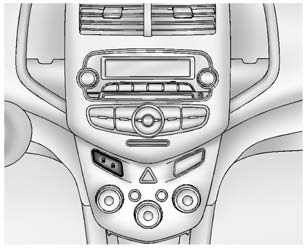
To lock the doors from inside the vehicle:
- Press on the central locking
switch or on the driver door switch. - Press the lock knob on the driver door to lock all doors and, if equipped, the liftgate.
To unlock the doors from inside the vehicle:
- Press on the central locking
switch or on the driver door switch. - Pull the door handle. Pulling the door handle again unlatches the door.
- Lift the lock knob on the driver door to unlock the driver door.
See Door Locks. See Central Locking System.


Other info:
Fiat Punto. General instructions
When a light is not working, check that the
corresponding fuse is intact before changing a bulb.
For the location of fuses, refer to the paragraph “If
a fuse blows” in this section;
Bef ...
Chevrolet Sonic. Remote Vehicle Start
If equipped, this feature allows the engine to be started from outside the vehicle.
(Remote Vehicle Start): This button
will be on the RKE transmitter if the vehicle has remote start.
The climate ...
Nissan Micra. Difference between predicted and actual
distances
The displayed guidelines and their locations on
the ground are for approximate reference only.
Objects on uphill or downhill surfaces or projecting
objects will be actually located at distances
...
Manuals For Car Models
-
 Chevrolet Sonic
 -
 Citroen C3
 -
 Fiat Punto
 -
 Honda Fit
 -
 Mazda 2
 -
 Nissan Micra
 -
 Peugeot 208
 -
 Renault Clio
 -
 Seat Ibiza
 -
 Skoda Fabia
 - Honda Pilot
- Volkswagen ID4
- Toyota Prius
