

Chevrolet Sonic: Window Lockout
Chevrolet Sonic Owners Manual
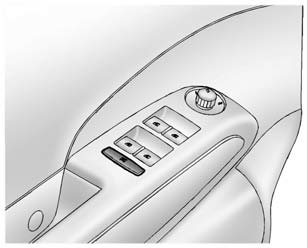
This feature prevents the rear passenger windows from operating, except from the driver position.
Press  to disable the rear window
switches.
Press  again to return to normal
window operation.


Other info:
Chevrolet Sonic. Fog Lamps (RS)
To replace the front fog lamp bulb:
1. Locate the fog lamp located under the front fascia.
2. Remove the cap from the back of the fog lamp assembly.
3. Disconnect the electrical connector from th ...
Chevrolet Sonic. Loss of Control
Skidding
There are three types of skids that correspond to the vehicle's three control
systems:
Braking Skid — wheels are not rolling.
Steering or Cornering Skid — too much speed or steer ...
Nissan Micra. Passenger compartment
CAUTION
Never use a fuse of higher or lower amperage
rating than that specified on the fuse
box cover.
If any electrical equipment does not operate,
check for an open fuse.
...
Manuals For Car Models
-
 Chevrolet Sonic
 -
 Citroen C3
 -
 Fiat Punto
 -
 Honda Fit
 -
 Mazda 2
 -
 Nissan Micra
 -
 Peugeot 208
 -
 Renault Clio
 -
 Seat Ibiza
 -
 Skoda Fabia
 - Honda Pilot
- Volkswagen ID4
- Toyota Prius
