

Citroen C3: USB reader
Citroen C3 Owners Manual
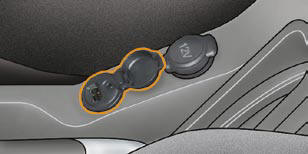
This connection box, consisting of a JACK socket and a USB port, is located on the centre console.
It permits the connection of portable equipment, such as a digital audio player of the iPod ® or USB stick type.
It reads the audio fi le formats (mp3, ogg, wma, wav...) which are transmitted to your audio equipment and played via the vehicle's speakers.
You can manage these fi les using the steering wheel controls or the audio equipment control panel and display them on the multifunction screen.
When it is in use, the portable equipment charges automatically.
For further details concerning the use of this equipment, refer to the Audio system part of the "Audio and Telematics" section.


Other info:
Chevrolet Sonic. Brake System Warning Light
The vehicle brake system consists of two hydraulic circuits. If one circuit is
not working, the remaining circuit can still work to stop the vehicle. For normal
braking performance, both circuits ...
Honda Fit. Audio System Basic Operation
To use the audio system function, the ignition switch must be in ACCESSORY
or
ON .
Use the selector knob to access some audio
functions.
Selector knob: Rotate left or right to scroll
throug ...
Chevrolet Sonic. Forward Collision Alert (FCA) System
For vehicles with FCA, this system is intended to help avoid or reduce the harm
caused by front-end crashes. FCA provides a flashing visual alert and beeps when
approaching a vehicle directly ahea ...
Manuals For Car Models
-
 Chevrolet Sonic
 -
 Citroen C3
 -
 Fiat Punto
 -
 Honda Fit
 -
 Mazda 2
 -
 Nissan Micra
 -
 Peugeot 208
 -
 Renault Clio
 -
 Seat Ibiza
 -
 Skoda Fabia
 - Honda Pilot
- Volkswagen ID4
- Toyota Prius
