
Fiat Punto: Seats
Fiat Punto Owners Manual
FRONT SEATS
Moving the seat backwards or forwards
Lift the lever (A) (on seat internal side) and push the seat forwards or backwards: in the driving position the arms should rest on the rim of the steering wheel
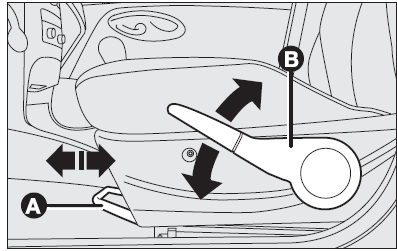
Seat height adjustment (where provided)
Move the lever (B) upwards or downwards to achieve the required height.
IMPORTANT Adjustment must be carried out only seated in the driver’s seat.
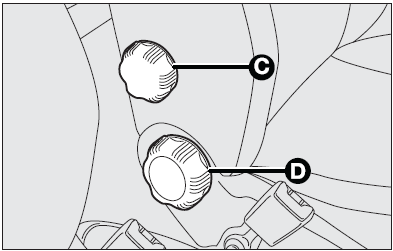
Back rest angle adjustment
Turn the knob (C).
Lumbar adjustment (where provided)
To adjust, turn the knob (D).
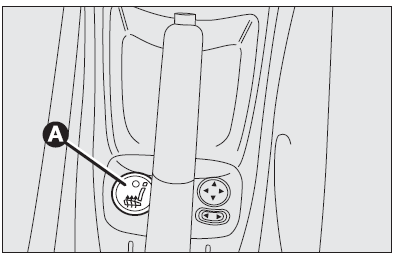
Seat warming (where provided)
Press button (A) to switch the seat warming on/off.
The led on the button will light up when the function is on.
 Only make adjustments Only make adjustments
when the car is stationary. |
 Once you have released Once you have released
the lever, check that the seat is firmly locked in the runners by trying to move it back and forth. Failure to lock the seat in place could result in the seat moving suddenly and the driver losing control of the car. |
Tilting the back rest (3-door versions)
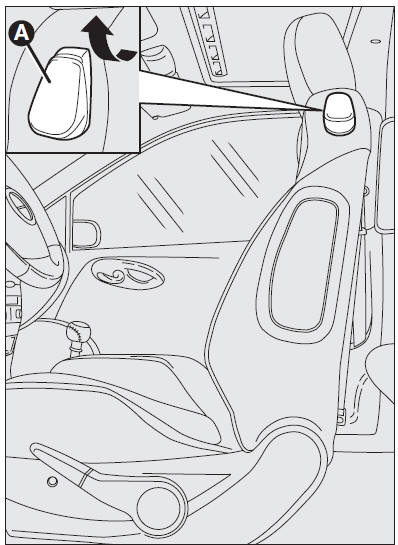
To gain access to the rear seats, pull the handle (A) upwards, the back rest folds and the seat is free to run forwards.
When resetting the back rest, the seat returns to its original position (mechanical memory).
Always check that the seat is firmly locked in the runners by trying to move it back and forth.


Other info:
Chevrolet Sonic. Power Door Locks
Select and the following may display:
Auto Door Unlock
Unlocked Door Anti Lock Out
Delayed Door Lock
Auto Door Unlock
Select to set which of the doors will automatically unlock when the ve ...
Peugeot 208. Front lamps
A. Model with light guide
1. Main beam headlamps (H7-55W).
2. Dipped beam headlamps (H7-55W).
3. Daytime running lamps / sidelamps (light emitting diodes - LEDs).
4. Direction indicators (PWY-24 ...
Honda Fit. Reporting Safety Defects
In the U.S.
If you believe that your vehicle has a defect which could cause a crash or
could cause injury or death, you
should immediately inform the National Highway Traffic Safety Administration ...
Manuals For Car Models
-
 Chevrolet Sonic
 -
 Citroen C3
 -
 Fiat Punto
 -
 Honda Fit
 -
 Mazda 2
 -
 Nissan Micra
 -
 Peugeot 208
 -
 Renault Clio
 -
 Seat Ibiza
 -
 Skoda Fabia
 - Honda Pilot
- Volkswagen ID4
- Toyota Prius
