

Honda Fit: Brightness Control
Honda Fit Owners Manual
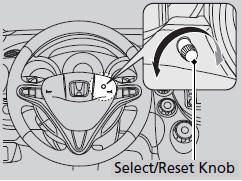
When the parking lights are turned on and the
ignition switch is in ON  , you can
use the
 (select/reset) knob to adjust
instrument
panel brightness.
Brighten
: Turn the knob to the right.
Dim
: Turn the knob to the left.
You will hear a beep when the brightness reaches minimum or maximum. The information display will return to its original state several seconds after you adjust the brightness.
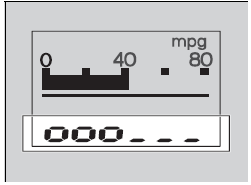
■ Brightness level indicator
The brightness level is shown on the information display while you are adjusting it.
Pressing the knob switches the
display.
If you turn the knob to the right until the brightness display is up to max, the beeper sounds. This cancels the reduced instrument panel brightness when the exterior lights are on.
The brightness can be set differently for when the exterior lights are on, and when they are off.


Other info:
Nissan Micra. Forward-facing child restraint installation
using LATCH
For additional information, refer to all Warnings
and Cautions in the “Child safety” and “Child
restraints” sections of this manual before installing
a child restraint.
Do not use the lo ...
Honda Fit. Auxiliary Input Jack
Use the jack to connect standard audio devices.
1. Open the AUX cover.
2. Connect a standard audio device to the
input jack using a 1/8 inch (3.5 mm) stereo
miniplug.
► The audio system a ...
Fiat Punto. Digital display
DISPLAY INFO
Headlight aiming position display (only with dipped beams on) (A)
Clock (B) (always displayed, also with key removed and front doors
closed).
Total (C) and partial (D) odome ...
Manuals For Car Models
-
 Chevrolet Sonic
 -
 Citroen C3
 -
 Fiat Punto
 -
 Honda Fit
 -
 Mazda 2
 -
 Nissan Micra
 -
 Peugeot 208
 -
 Renault Clio
 -
 Seat Ibiza
 -
 Skoda Fabia
 - Honda Pilot
- Volkswagen ID4
- Toyota Prius
