

Honda Fit: Maintenance MinderTM
Honda Fit Owners Manual
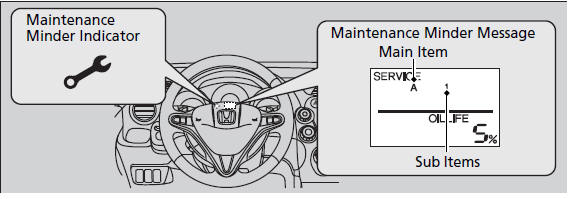
If the engine oil life is less than 15%, you will see the Maintenance Minder
messages
appear on the information display every time you turn the ignition switch to ON
 .
.
The messages notify you when to change the engine oil, or when to bring your vehicle to a dealer for indicated maintenance services.
To Use Maintenance MinderTM
■Displaying the Engine Oil Life
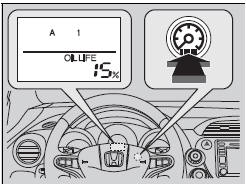
1. Turn the ignition switch to ON .
2. Press the  (select/reset) knob
repeatedly
until the engine oil life appears on the
information display.
The Maintenance Minder indicator ( 
)
stays on in the instrument panel after the
engine oil life becomes 0%. Have the
indicated maintenance done by a dealer
immediately.
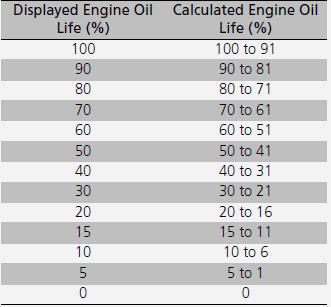
Based on the engine operating conditions, the remaining engine oil life is calculated and displayed as a percentage.
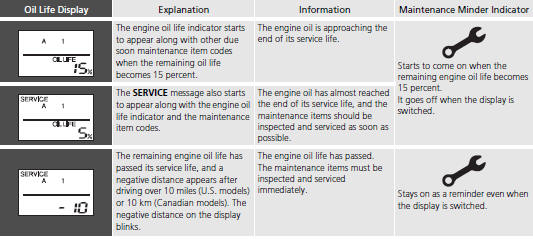
■Maintenance Minder Messages on the Information Display
To switch the display, press the
(select/reset) knob.
■Maintenance Service Items
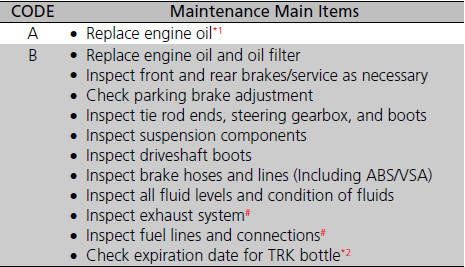
*1: If a message SERVICE does not appear more than 12 months after the display is reset, change the engine oil every year.
*2: Canadian A/T models only # : See information on maintenance and emissions warranty.
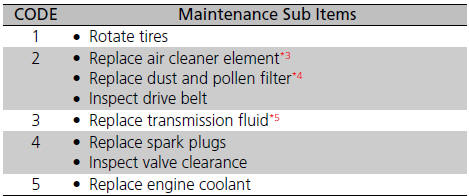
*3: If you drive in dusty conditions, replace the air cleaner element every 15,000 miles (24,000 km).
*4: If you drive primarily in urban areas that have high concentrations of soot in the air from industry and from diesel-powered vehicles, replace every 15,000 miles (24,000 km).
*5: If you tow a Fit behind a motorhome, the transmission fluid must be changed every 2 years or 30,000 miles (48,000 km), whichever comes first. (For A/T only)
• Independent of the Maintenance Minder information, replace the brake fluid every 3 years.
• Inspect idle speed every 160,000 miles (256,000 km).
• Adjust the valves during services A, B, 1, 2, or 3 if they are noisy.
■Resetting the Display
Reset the engine oil life display if you have performed the maintenance service.
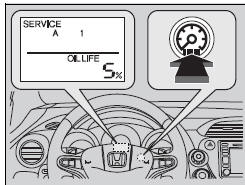
1. Turn the ignition switch to ON  .
.
2. Display the engine oil life by repeatedly
pressing the  (select/reset) knob.
3. Press and hold the  knob for ten
seconds
or more.
► The engine oil life indicator and the maintenance item codes blink.
4. Press the  knob for five seconds
or more.
► The displayed maintenance items disappear, and the engine oil life display returns to 100%.
NOTICE
Failure to reset the engine oil life after a maintenance service results in the system showing incorrect maintenance intervals, which can lead to serious mechanical problems.
The dealer will reset the engine oil life display after completing the required maintenance service. If someone other than a dealer performs maintenance service, reset the engine oil life display yourself.


Other info:
Honda Fit. Safety When Performing Maintenance
Some of the most important safety precautions are given here.
However, we cannot warn you of every conceivable hazard that can arise in
performing maintenance. Only you can decide whether or not y ...
Chevrolet Sonic. OnStar Additional Information
Transferring Service
Press to request account transfer
eligibility information. The Advisor can assist in canceling or removing account
information. If OnStar receives information that vehicle o ...
Skoda Fabia. Avoiding damage to your vehicle
General information
Pay attention to low-slung parts of the vehicle, such as the spoiler and
exhaust,
particularly in the following situations.
When driving on poorly maintained roads and trac ...
Manuals For Car Models
-
 Chevrolet Sonic
 -
 Citroen C3
 -
 Fiat Punto
 -
 Honda Fit
 -
 Mazda 2
 -
 Nissan Micra
 -
 Peugeot 208
 -
 Renault Clio
 -
 Seat Ibiza
 -
 Skoda Fabia
 - Honda Pilot
- Volkswagen ID4
- Toyota Prius
