

Nissan Micra: CD care and cleaning
Nissan Micra Owners Manual
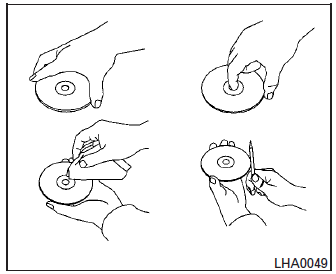
- Handle a CD by its edges. Do not bend the disc. Never touch the surface of the disc.
- Always place the discs in the storage case when they are not being used.
- To clean a disc, wipe the surface from the center to the outer edge using a clean, soft cloth. Do not wipe the disc using a circular motion.
- Do not use a conventional record cleaner or alcohol intended for industrial use.
- A new disc may be rough on the inner and outer edges. Remove the rough edges by rubbing the inner and outer edges with the side of a pen or pencil as illustrated.


Other info:
Fiat Punto. To close the bonnet
Proceed as follows:
hold the bonnet up with one hand and, with the
other, remove rod (C) from recess (D) replace it in
its clip;
lower the bonnet at approx. 20 cm from the engine
compartme ...
Peugeot 208. Quality of the fuel used for petrol engines
The petrol engines are perfectly compatible with E10 or E24 type petrol biofuels
(containing 10 % or 24 % ethanol), conforming to European standards EN 228 and EN
15376. E85 type fuels (containing ...
Honda Fit. Precautions for Opening/Closing the Tailgate
Always make sure individuals and objects are clear of the tailgate before
opening or
closing it.
■ Opening the tailgate
• Open the tailgate all the way.
►If it is not fully opened, ...
Manuals For Car Models
-
 Chevrolet Sonic
 -
 Citroen C3
 -
 Fiat Punto
 -
 Honda Fit
 -
 Mazda 2
 -
 Nissan Micra
 -
 Peugeot 208
 -
 Renault Clio
 -
 Seat Ibiza
 -
 Skoda Fabia
 - Honda Pilot
- Volkswagen ID4
- Toyota Prius
