

Nissan Micra: Speedometer and odometer
Nissan Micra Owners Manual
This vehicle is equipped with a speedometer and odometer. The speedometer is located in the center of the meter cluster. The odometer is located within the trip computer.
Speedometer
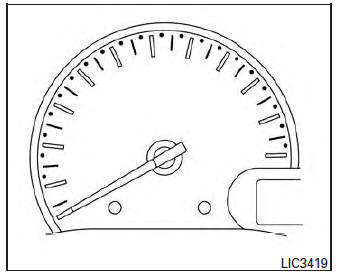
The speedometer indicates the vehicle speed
Odometer/Twin trip odometer
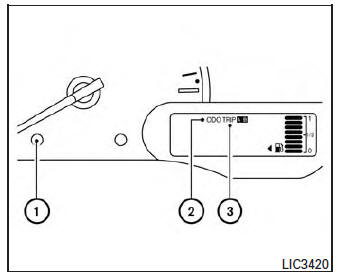
The odometer/twin trip odometer is displayed when the ignition switch is placed in the ON position.
The odometer 2 records the total distance the vehicle has been driven.
The twin trip odometer 3 records the distance of individual trips.
Changing the display
Press the change button 1 to change the display as follows: Odo→Trip A→Trip B→Ins fuel consumption→ Average fuel consumption → Cruising range or (DTE) → Odo For trip computer information, refer to “Trip computer” in this section.
Resetting the trip odometer
Press the change/reset button 1 for more than 1 second to reset the currently displayed trip odometer to zero.


Other info:
Renault Clio. Electric windows
These systems operate with the ignition
on or off, until one of the front doors
is opened (limited to about 3 minutes).
Safety of rear occupants
The driver can prevent operation
of the ...
Chevrolet Sonic. System Settings
Configuring the Number of Favorite Pages
To configure the number of available favorite pages:
1. Press the Push/MENU/TUNE button.
2. Select Radio Settings.
3. Select Radio Favorites.
4. Select ...
Skoda Fabia. Multifunction display (MFD)
The multifunction display can only be operated when the ignition is switched
on. After the ignition is switched on, the function displayed is the one which
you last selected before switching off the ...
Manuals For Car Models
-
 Chevrolet Sonic
 -
 Citroen C3
 -
 Fiat Punto
 -
 Honda Fit
 -
 Mazda 2
 -
 Nissan Micra
 -
 Peugeot 208
 -
 Renault Clio
 -
 Seat Ibiza
 -
 Skoda Fabia
 - Honda Pilot
- Volkswagen ID4
- Toyota Prius
