
Peugeot 208: Forwards-backwards
Peugeot 208 Owners Manual
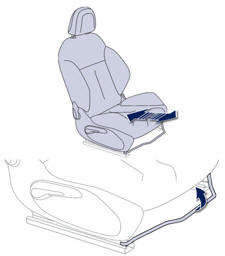
Raise the control and slide the seat forwards or backwards.


Other info:
Nissan Micra. Towing recommended by NISSAN
Automatic transmission (A/T)
Manual transmission (M/T)
NISSAN recommends that your vehicle be towed
with the driving (front) wheels off the ground or
place the vehicle on a flat bed truc ...
Peugeot 208. Manual gear changing
This selective gear change mode enables you to overtake, for example, while still
remaining in automatic mode.
Operate the + or - steering mounted control paddle.
The gearbox engages the gear re ...
Ford Fiesta. Driving Hints
Breaking-In
Tires
WARNING
New tires need to be run-in for
approximately 300 miles (500
kilometers). During this time, you
may experience different driving
characteristics.
Brakes and Clutch
WARNING
Av ...
Manuals For Car Models
-
 Chevrolet Sonic
 -
 Citroen C3
 -
 Fiat Punto
 -
 Honda Fit
 -
 Mazda 2
 -
 Nissan Micra
 -
 Peugeot 208
 -
 Renault Clio
 -
 Seat Ibiza
 -
 Skoda Fabia
 - Honda Pilot
- Volkswagen ID4
- Toyota Prius
