Peugeot 208: Instrument panels
Peugeot 208 Owners Manual
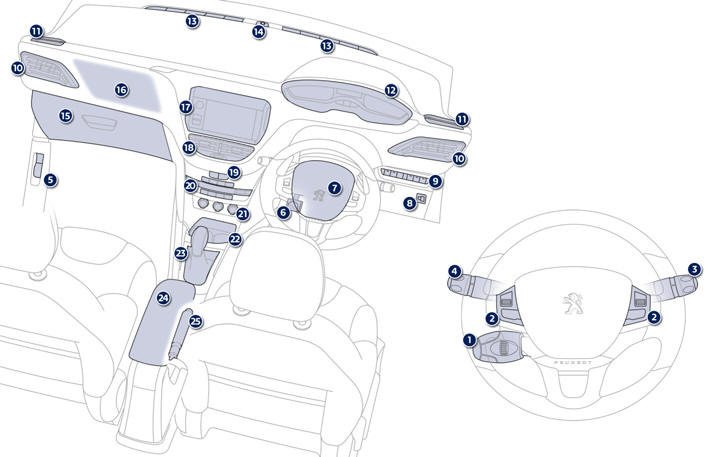
1. Cruise control / speed limiter controls.
2. Steering mounted controls for the touch screen.
3. Wiper / screenwash / trip computer stalk.
4. Lighting and direction indicator stalk 5. Bonnet release lever.
6. Steering wheel adjustment control.
7. Driver's airbag. Horn.
8. Headlamp height adjustment.
9. Switch panel.
19. Central locking and hazard warning buttons.
20. Heating / air conditioning controls.
21. 12 V accessory socket. USB port / auxiliary socket. Additional USB port.
22. Open storage. Cup holder.
23. Gear lever.
24. Central armrest with storage.
25. Parking brake.


Other info:
Chevrolet Sonic. Scheduling Service Appointments
When the vehicle requires warranty service, contact your dealer and request an
appointment. By scheduling a service appointment and advising the service consultant
of your transportation needs, yo ...
Nissan Micra. Head restraints/headrests
WARNING
Head restraints/headrests supplement
the other vehicle safety systems. They may
provide additional protection against injury
in certain rear end collisions. Adjustable
he ...
Mazda 2. Limitations to SRS Air Bag
In severe collisions such as those described previously in "SRS Air Bag
Deployment
Criteria", the applicable SRS air bag equipment will deploy. However, in some
accidents,
the equipmen ...
Manuals For Car Models
-
 Chevrolet Sonic
 -
 Citroen C3
 -
 Fiat Punto
 -
 Honda Fit
 -
 Mazda 2
 -
 Nissan Micra
 -
 Peugeot 208
 -
 Renault Clio
 -
 Seat Ibiza
 -
 Skoda Fabia
 - Honda Pilot
- Volkswagen ID4
- Toyota Prius
