
Peugeot 208: Programming
Peugeot 208 Owners Manual
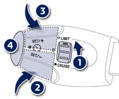
Turn thumb wheel 1 to the "LIMIT" position: the speed limiter mode is selected but is not switched on (PAUSE).
You do not have to switch the speed limiter on in order to set the speed.
Set the speed value by pressing button 2 or 3 (e.g.: 55 mph (90 km/h)). You can then change the programmed speed using buttons 2 and 3:
- by + or - 1 mph (km/h) = short press, - by + or - 5 mph (km/h) = long press, - in steps of + or - 5 mph (km/h) = maintained press.
- Switch the speed limiter on by pressing button 4 .
- Switch the speed limiter off by pressing button 4: the display confirms that it has been switched off (PAUSE).
- Switch the speed limiter back on by pressing button 4 again.


Other info:
Skoda Fabia. Washing the car
The best protection for your vehicle against harmful environmental influences
is frequent washing.
How often the vehicle should be washed depends, for example, on the following
factors.
Frequ ...
Citroen C3. Airbags
System designed to maximise the safety
of the occupants (with the exception of
the rear centre passenger) in the event
of violent collisions. It supplements the
action of the force-limiting se ...
Fiat Punto. Emergency start-up
If the Fiat CODE system fails to deactivate engine
immobilising system the warning lights
and
stay on and the engine cannot be started.
To start the engine the emergency start-up can be
perfo ...
Manuals For Car Models
-
 Chevrolet Sonic
 -
 Citroen C3
 -
 Fiat Punto
 -
 Honda Fit
 -
 Mazda 2
 -
 Nissan Micra
 -
 Peugeot 208
 -
 Renault Clio
 -
 Seat Ibiza
 -
 Skoda Fabia
 - Honda Pilot
- Volkswagen ID4
- Toyota Prius
