

Chevrolet Sonic: Instrument Panel Illumination Control
Chevrolet Sonic Owners Manual
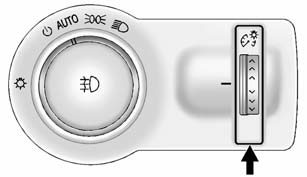
This feature controls the brightness of the instrument panel controls and infotainment display screen. The thumbwheel is to the left of the steering column on the instrument panel.
 (Instrument Panel Brightness): Move
the thumbwheel up or down and hold, to brighten or dim the instrument panel controls
and infotainment display screen.


Other info:
Citroen C3. Airbags
System designed to maximise the safety
of the occupants (with the exception of
the rear centre passenger) in the event
of violent collisions. It supplements the
action of the force-limiting se ...
Renault Clio. Weights
The weights indicated for a basic vehicle without options: they vary
depending on the your vehicle’s equipment. Consult
your approved Dealer.
* Towing weight (towing a caravan, boat, etc.)
...
Chevrolet Sonic. Hill and Mountain Roads
Driving on steep hills or through mountains is different than driving on flat
or rolling terrain. Tips for driving in these conditions include:
Keep the vehicle serviced and in good shape.
Che ...
Manuals For Car Models
-
 Chevrolet Sonic
 -
 Citroen C3
 -
 Fiat Punto
 -
 Honda Fit
 -
 Mazda 2
 -
 Nissan Micra
 -
 Peugeot 208
 -
 Renault Clio
 -
 Seat Ibiza
 -
 Skoda Fabia
 - Honda Pilot
- Volkswagen ID4
- Toyota Prius
