
Chevrolet Sonic: Manual Mode
Chevrolet Sonic Owners Manual
To use this feature:
1. Move the shift lever from D (Drive) rearward to M(Manual Mode).
While driving in manual mode, the transmission will remain in the driver selected gear. When coming to a stop in the manual position, the vehicle will automatically shift into 1 (First) gear.
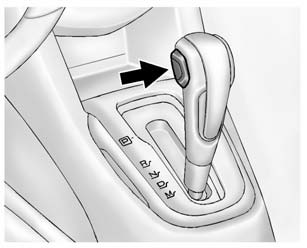
2. Press the + (plus) end of the button on the side of the shift lever to upshift, or press the − (minus) end of the button to downshift.
The Driver Information Center (DIC) in the instrument cluster will change from the currently displayed message to the letter “M,” for Manual position, and a number indicating the requested gear.
While using manual mode, the transmission will have firmer shifting and sportier performance. You can use this for sport driving or when climbing hills to stay in gear longer or to downshift for more power or engine braking.
The transmission will only allow you to shift into gears appropriate for the vehicle speed and engine revolutions per minute (rpm):
- The transmission will not automatically shift to the next higher gear if the vehicle speed or engine rpm is too low.
- The transmission will not allow shifting to the next lower gear if the vehicle speed or engine rpm is too high.


Other info:
Mazda 2. Adjustable Speed Limiter
The adjustable speed limiter is a function to prevent the vehicle from being
driven at a
vehicle speed faster than a set speed. The vehicle speed is controlled to kept
it below the set
speed eve ...
Renault Clio. Ashtray, cigarette lighter
Cigarette lighter 1
With the ignition on, push in the cigarette
lighter 1. It will spring back with a
click when it is ready. Pull it out to use.
After use, replace it without pushing it
al ...
Renault Clio. Five-door version
Side lights/brake and direction
indicator lights
Open the boot lid and remove screws 1.
The bulbs are under pressure
and can break when
replaced.
Risk of injury.
To re ...
Manuals For Car Models
-
 Chevrolet Sonic
 -
 Citroen C3
 -
 Fiat Punto
 -
 Honda Fit
 -
 Mazda 2
 -
 Nissan Micra
 -
 Peugeot 208
 -
 Renault Clio
 -
 Seat Ibiza
 -
 Skoda Fabia
 - Honda Pilot
- Volkswagen ID4
- Toyota Prius
