

Chevrolet Sonic: Mirror Adjustment
Chevrolet Sonic Owners Manual
Exterior Mirrors
Manual Outside Mirrors
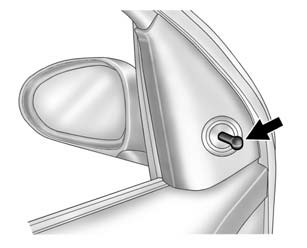
Move the control up, down, or side to side to adjust the mirror.
See Manual Mirrors.
Power Outside Mirrors
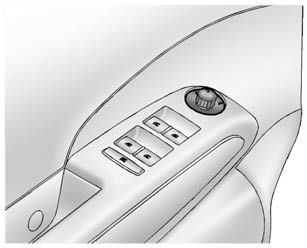
For vehicles with power outside mirrors:
1. Select the mirror by moving the selector switch to L for the driver side or R for the passenger side.
2. Use the control knob to move the mirror in the desired direction.
See Power Mirrors.
Interior Mirror
Hold the inside rearview mirror in the center to move it for a clearer view behind your vehicle. Adjust the mirror to avoid glare from the headlamps behind you. Push the tab forward for daytime use and pull it for nighttime use.
See Manual Rearview Mirror.


Other info:
Chevrolet Sonic. Safety Locks
The rear door safety locks prevent passengers from opening the rear doors from
inside the vehicle.
Manual Safety Locks
If equipped, the safety lock is located on the inside edge of the rear door ...
Mazda 2. Vent Operation
Adjusting the Vents
Directing airfl ow
To adjust the direction of airfl ow, move the
adjustment knob.
NOTE
When using the air conditioner under
humid ambient temperature conditions,
the system ...
Chevrolet Sonic. Engine Exhaust
Warning
Engine exhaust contains carbon monoxide (CO) which cannot be seen or smelled.
Exposure to CO can cause unconsciousness and even death.
Exhaust may enter the vehicle if:
. The vehicle i ...
Manuals For Car Models
-
 Chevrolet Sonic
 -
 Citroen C3
 -
 Fiat Punto
 -
 Honda Fit
 -
 Mazda 2
 -
 Nissan Micra
 -
 Peugeot 208
 -
 Renault Clio
 -
 Seat Ibiza
 -
 Skoda Fabia
 - Honda Pilot
- Volkswagen ID4
- Toyota Prius
