

Chevrolet Sonic: Turn and Lane-Change Signals
Chevrolet Sonic Owners Manual
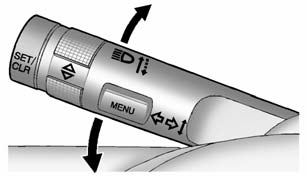
Move the lever all the way up or down to signal a turn.
An arrow on the instrument cluster will flash in the direction of the turn or lane change.
Raise or lower the lever until the arrow starts to flash to signal a lane change. Hold it there until the lane change is completed. If the lever is briefly pressed and released, the turn signal flashes three times.
The lever returns to its neutral position when it is released.
If after signaling a turn or lane change the arrow flashes rapidly or does not come on, a signal bulb may be burned out. Replace any burned out bulbs. If a bulb is not burned out, check the fuse. See Fuses and Circuit Breakers or Bulb Replacement.
Turn Signal On Chime
If the turn signal is left on for more than 1.2 km (0.75 mi), a chime will sound at each flash of the turn signal. To turn the chime off, move the turn signal lever to the neutral position.


Other info:
Chevrolet Sonic. Forward Collision Alert (FCA) System
For vehicles with this feature, read the following section before using it.
The Forward Collision Alert (FCA) system may help to avoid or reduce the harm
caused by front-end crashes. FCA provides a ...
Fiat Punto. Engine coolant temperature gauge
This shows the temperature of the engine coolant fluid and begins working
when the fluid temperature exceeds
approx. 50°C.
Under normal conditions, the needle should hover around the middle of ...
Peugeot 208. Manual controls
The wipers are controlled directly by the driver.
Model without AUTO wiping
Model with AUTO wiping
Windscreen wipers
Wiping speed:
Rear wiper
Rear wiper selection ring:
park,
intermi ...
Manuals For Car Models
-
 Chevrolet Sonic
 -
 Citroen C3
 -
 Fiat Punto
 -
 Honda Fit
 -
 Mazda 2
 -
 Nissan Micra
 -
 Peugeot 208
 -
 Renault Clio
 -
 Seat Ibiza
 -
 Skoda Fabia
 - Honda Pilot
- Volkswagen ID4
- Toyota Prius
