

Chevrolet Sonic: Vehicle Alarm System
Chevrolet Sonic Owners Manual
This vehicle has an anti-theft alarm system.
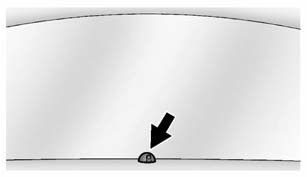
The indicator light on the instrument panel near the windshield indicates the status of the system.
Off: Vehicle is disarmed.
On Solid: Vehicle is secured during the delay to arm the system.
Fast Flash: Vehicle is unsecured. A door, the hood, or the trunk/ liftgate is open.
Slow Flash: Alarm system is armed.


Other info:
Chevrolet Sonic. Fuses and Circuit Breakers
The wiring circuits in the vehicle are protected from short circuits by a combination
of fuses, circuit breakers, and fusible thermal links. This greatly reduces the
chance of fires caused by elec ...
Peugeot 208. Operation
On an ascending slope, with the vehicle stationary, the vehicle is held for a
brief moment when you release the brake pedal:
- if you are in first gear or neutral with a manual gearbox,
- if you ...
Peugeot 208. Front airbags
System which protects the driver and front passenger in the event of a serious
front impact in order to limit the risk of injury to the head and thorax.
The driver's airbag is fitted in the c ...
Manuals For Car Models
-
 Chevrolet Sonic
 -
 Citroen C3
 -
 Fiat Punto
 -
 Honda Fit
 -
 Mazda 2
 -
 Nissan Micra
 -
 Peugeot 208
 -
 Renault Clio
 -
 Seat Ibiza
 -
 Skoda Fabia
 - Honda Pilot
- Volkswagen ID4
- Toyota Prius
