

Citroen C3: USB reader
Citroen C3 Owners Manual
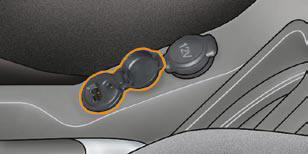
This connection box, consisting of a JACK socket and a USB port, is located on the centre console.
It permits the connection of portable equipment, such as a digital audio player of the iPod ® or USB stick type.
It reads the audio fi le formats (mp3, ogg, wma, wav...) which are transmitted to your audio equipment and played via the vehicle's speakers.
You can manage these fi les using the steering wheel controls or the audio equipment control panel and display them on the multifunction screen.
When it is in use, the portable equipment charges automatically.
For further details concerning the use of this equipment, refer to the Audio system part of the "Audio and Telematics" section.


Other info:
Peugeot 208. Sport and snow programmes
These two special programmes supplement the automatic operation in very specific
conditions of use.
Sport programme "S"
Press button "S", after starting the engine.
The gearbo ...
Chevrolet Sonic. Safety Belt Extender
If the vehicle's safety belt will fasten around you, you should use it.
But if a safety belt is not long enough, your dealer will order you an extender.
When you go in to order it, take the heavies ...
Chevrolet Sonic. Automatic Transmission
Move the shift lever to P (Park) or N (Neutral). The engine will not start in
any other position. To restart the engine when the vehicle is already moving, use
N (Neutral) only.
Caution
Do not t ...
Manuals For Car Models
-
 Chevrolet Sonic
 -
 Citroen C3
 -
 Fiat Punto
 -
 Honda Fit
 -
 Mazda 2
 -
 Nissan Micra
 -
 Peugeot 208
 -
 Renault Clio
 -
 Seat Ibiza
 -
 Skoda Fabia
 - Honda Pilot
- Volkswagen ID4
- Toyota Prius
