

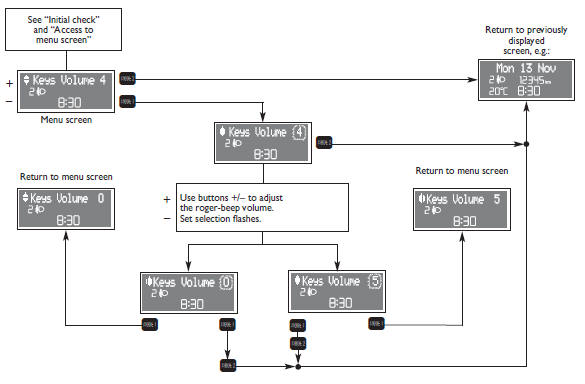
Fiat Punto: Button volume (Keys Volume)
Fiat Punto Owners Manual
The volume of the roger-beep accompanying the activation of certain buttons can be adjusted according to 8 levels.
The roger-beep can be adjusted and excluded. To adjust the volume proceed as follows:


Other info:
Chevrolet Sonic. Ignition Transmission Lock Check
While parked, and with the parking brake set, try to turn the ignition to LOCK/OFF
in each shift lever position.
For automatic transmission vehicles, the ignition should turn to LOCK/OFF
only ...
Nissan Micra. Seat belt warning light
Both the driver’s and passenger’s front seats are
equipped with a seat belt warning light. The warning
light, located on the instrument panel, will show
the status of the driver and passeng ...
Honda Fit. Safety When Performing Maintenance
Some of the most important safety precautions are given here.
However, we cannot warn you of every conceivable hazard that can arise in
performing maintenance. Only you can decide whether or not y ...
Manuals For Car Models
-
 Chevrolet Sonic
 -
 Citroen C3
 -
 Fiat Punto
 -
 Honda Fit
 -
 Mazda 2
 -
 Nissan Micra
 -
 Peugeot 208
 -
 Renault Clio
 -
 Seat Ibiza
 -
 Skoda Fabia
 - Honda Pilot
- Volkswagen ID4
- Toyota Prius
