Fiat Punto: Ceiling lights
Fiat Punto Owners Manual
FRONT CEILING LIGHT
With toggling lens
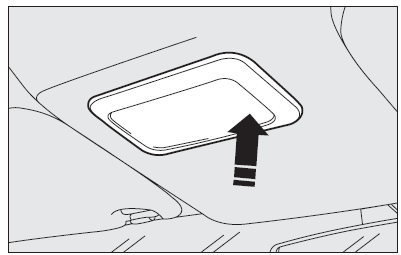
The light will come on automatically when a front door is opened and go out when the door is closed.
Press the short side of the lens to switch the light on and off when the doors are closed, as shown in the figure.
With map reading lights
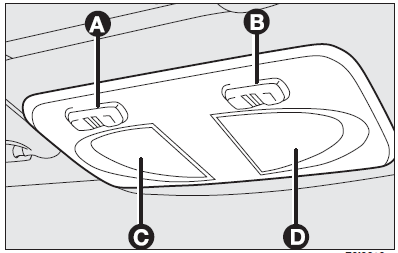
Press switch (A) to switch the light on and off.
Switch (B) operates the map reading light.
With switch (A) in central position, lights (C) and (D) will come on/off when doors are opened/closed.
With switch (A) pressed to the left, lights (C) and (D) are off and they will not come on when doors are opened.
With switch (A) pressed to the right, lights (C) and (D) will come on regardless of the position of the doors.
On certain versions, lights come on/off gradually.
With light off, switch (B) turn on the following lights:
- map reading light (C) if pressed to the left;
- map reading light (D) if pressed to the right.
IMPORTANT Make sure that both switches are in central position before getting out of the car. This ensures that lights go out when the doors are closed preventing the battery from running down.
Ceiling light timing
Two timing strategies are available on certain versions, in order to facilitate getting in and out of the car, especially at night in dark areas.
Timing for getting into the car
The ceiling lights will come on as follows:
- for about 10 seconds when the front doors are unlocked;
- for about 3 minutes when one of the side doors is opened;
- for about 10 seconds when a door is closed (within the three minutes).
Timing will be stopped when the ignition key is turned to MAR.
Timing for getting out of the car
The ceiling lights will come on as follows when the key is removed from the ignition switch:
- for about 10 seconds within two minutes after stopping the engine;
- for about 3 minutes when one of the side doors is opened;
- for about 7 minutes when a door is closed (within the three minutes).
The timeout will automatically end when the doors are locked.


Other info:
Honda Fit. Precautions for Opening/Closing the Tailgate
Always make sure individuals and objects are clear of the tailgate before
opening or
closing it.
■ Opening the tailgate
• Open the tailgate all the way.
►If it is not fully opened, ...
Citroen C3. Fuel tank
Fuel tank capacity: approximately
50 litres (petrol) or 45 litres (Diesel).
Low fuel level
When the fuel tank minimum
level is reached this warning
lamp comes on on the instrument
panel. W ...
Skoda Fabia. Instrument cluster
Fault display
The Error message will appear in the display if there is a fault in the
instrument
cluster. Ensure that the fault is rectified as soon as possible by a specialist
workshop.
WARNING ...
Manuals For Car Models
-
 Chevrolet Sonic
 -
 Citroen C3
 -
 Fiat Punto
 -
 Honda Fit
 -
 Mazda 2
 -
 Nissan Micra
 -
 Peugeot 208
 -
 Renault Clio
 -
 Seat Ibiza
 -
 Skoda Fabia
 - Honda Pilot
- Volkswagen ID4
- Toyota Prius
