

Fiat Punto: Extending the boot
Fiat Punto Owners Manual
Single rear seat
Proceed as follows:
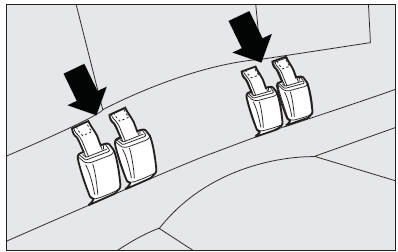
- fasten the seat buckles to the tabs on the seat back (as shown by arrows);
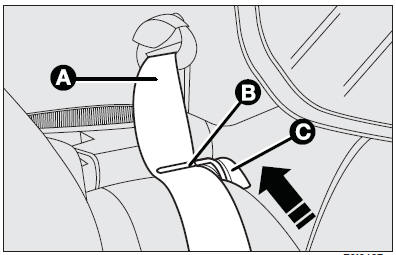
- check that the webbing (A) of each of the two side seat belts is inserted into the respective belt guiding catch (B);
- release the seat back moving the levers (C) as shown by the arrow.
Tilt it to make a single loading surface with the boot floor.
Split rear seat back (where provided)
The boot can be extended completely or partially.
For partial extension fold the required seat side; proceed as follows:
- remove the parcel shelf (see next paragraph);
- press the button by the side of the two supports and remove the head restraints by pulling them upwards;
- check that the webbing (A) of each of the two side seat belts is inserted into the respective belt guiding tongue (B);
- release the seat back moving lever (C), then tilt it.
To fold the whole seat, lift the cushion and then tip the seat backs as described for the rear single seat.
The central three-point seat belt and reel mechanism (where fitted) can be removed as follows:
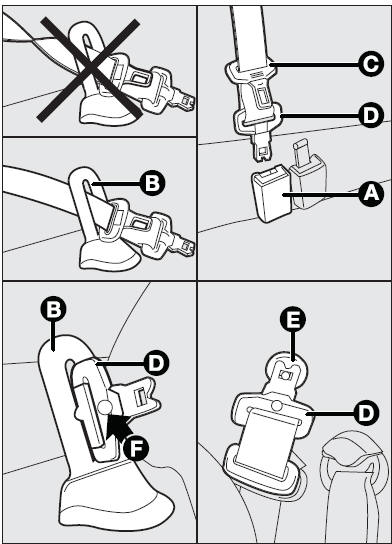
- press the black button on the buckle (A) if the seat belt is fastened;
- take the central belt slowly to the loop retainer (B) on the upper part of the seat back and remove the second tongue (C) from the loop retainer;
- remove the first tongue (D) from the loop retainer and fasten it to the specific pin (E) on the rear pillar panel;
To restore conditions for use:
- release the first tongue (D) from pin (E);
- insert the first tongue (D) in loop retainer (B) without twisting the belt. Make notch (F) on the belt tongue coincide with the respective groove on the loop retainer and insert the second tongue (C) in the loop retainer;
- pull the belt gently through loop retainer (B), and fasten the first tongue (D) in buckle (A) (grey with black button). Make the two yellow dots (one on the tongue and one on the buckle) coincide.


Other info:
Skoda Fabia. Instrument cluster
Fault display
The Error message will appear in the display if there is a fault in the
instrument
cluster. Ensure that the fault is rectified as soon as possible by a specialist
workshop.
WARNING ...
Fiat Punto. Key with remote control (where provided)
Key (B) (or (D) in alternative), delivered together with key (A) or (C)
when the car is fitted with remote control, controls the following:
the ignition switch;
the door and boot locks;
the f ...
Skoda Fabia. Starting and stopping the engine
The engine can only be started using a correctly coded original key.
The engine running noises may louder at first be louder for a short time after
starting the cold engine. This is quite normal a ...
Manuals For Car Models
-
 Chevrolet Sonic
 -
 Citroen C3
 -
 Fiat Punto
 -
 Honda Fit
 -
 Mazda 2
 -
 Nissan Micra
 -
 Peugeot 208
 -
 Renault Clio
 -
 Seat Ibiza
 -
 Skoda Fabia
 - Honda Pilot
- Volkswagen ID4
- Toyota Prius
