
Fiat Punto: Rain sensor (where provided)
Fiat Punto Owners Manual
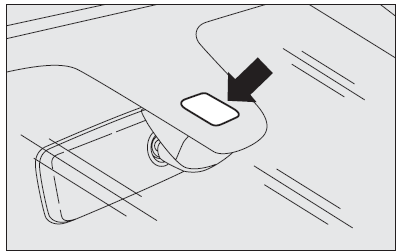
The rain sensor is behind the driving mirror in contact with the windscreen and has the purpose of automatically adjust, during the intermittent operation, the frequency of the windscreen wiper strokes as to the rain intensity.
The sensor has a range of adjustment that gradually varies between wiper stationary (no wiping) when the windscreen is dry, to wiper at first continuous speed (continuous slow) with heavy rain.
Activation
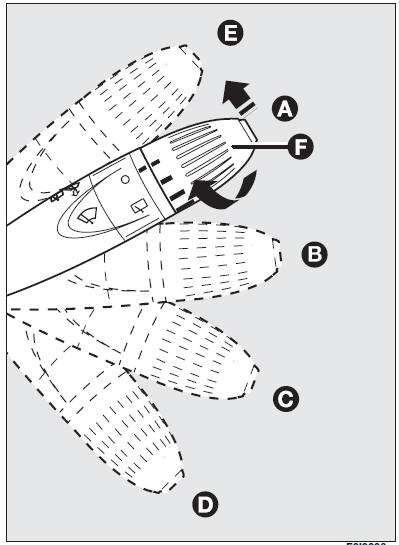
Move the right-hand stalk downwards by one position.
The activation of the rain sensor is signalled by a control acquisition “stroke”.
IMPORTANT Keep clean the glass in the sensor area.
Turning the knurled ring (F) it is possible to increase the sensitivity of the rain sensor, obtaining a quicker change from stationary (no wiping) when the windscreen is dry, to first continuous speed (continuous, slow).
The increase of the sensitivity of the rain sensor is signalled by a control and acquisition “cycle”.
Operating the windscreen washer with the rain sensor activated the normal washing cycle is performed at the end of which the rain sensor resumes its normal automatic function.
Deactivation
Turn the ignition key to STOP.
At the following starting operation (key at MAR), the sensor will not be reactivated even is the stalk is on (B). In this event, to activate the rain sensor, you have to move the stalk to (A) or (C) and then again to (B).
When the rain sensor is again activated in this way, at least one windscreen wiper stroke occurs, even if the windscreen is dry.
The rain sensor is able to recognize and automatically adjust itself in the presence of the following particular conditions:
- impurities on the controlled surface (salt, dirt, etc.);
- straks of water caused by worn wiper blades;
- difference between day and night.
 Do not activate the Do not activate the
rain sensor when washing the car in an automatic washing station. |
 In the event of ice on In the event of ice on
the windscreen, make sure to have disconnected the device. |
 Make sure the device is Make sure the device is
off when cleaning the windscreen. |


Other info:
Mazda 2. Emergency Operation for Starting the Engine
If the KEY warning light (red) illuminates,
or the push button start indicator light
(amber) fl ashes, this could indicate that
the engine may not start using the usual
starting method. Have your ...
Seat Ibiza. Side airbags
Description of side airbags
The airbag system is not a substitute for the seat belts.
Fig. 21 Side airbag in driver seat
The side airbags are located in the driver seat and front passenger seat b ...
Seat Ibiza. Brake fluid
Checking the brake fluid level
The brake fluid is checked at the intervals given in the service schedule.
Fig. 133 In the engine compartment: Brake fluid reservoir cover
– Read off the fluid le ...
Manuals For Car Models
-
 Chevrolet Sonic
 -
 Citroen C3
 -
 Fiat Punto
 -
 Honda Fit
 -
 Mazda 2
 -
 Nissan Micra
 -
 Peugeot 208
 -
 Renault Clio
 -
 Seat Ibiza
 -
 Skoda Fabia
 - Honda Pilot
- Volkswagen ID4
- Toyota Prius
