
Fiat Punto: Reconfigurable multifunction display
Fiat Punto Owners Manual
The “Multifunction display” shows all the useful information necessary when driving, more particularly:
INFORMATION ON STANDARD SCREEN
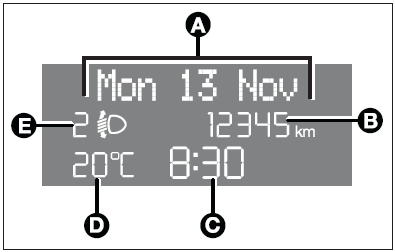
- Date (A).
- Total odometer (B).
- Clock (C).
- External temperature (D).
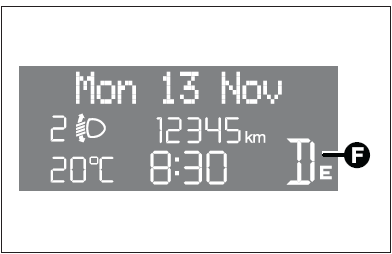
- Speedgear or Dualogic info display (where provided) (F).
With ignition key removed and front doors closed the display is off.
With ignition key removed, when opening one of the front doors the display comes on showing the clock and the odometer indication.
If the “Follow me home” function is on (see paragraph “Follow me home” in this section), the display will show the time the function is on (see section “Warning lights and messages”).
INFORMATION ABOUT CAR CONDITIONS (at event)
- Scheduled maintenance programme intervals.
- Trip computer information.
- Light adjustment of graphics/index/instrument cluster display and twozone climate control system (where provided).
- Display of failure/warning/function activation messages.
- Headlight aiming position display (with dipped beam headlights on) (E).
- Repetition of audio info.
There is also a menu enabling to perform the following adjustments and/or settings using the control buttons (see previous pages):
- Set-up menu
- Initial check
- Menu description
- Access to menu screen
- Speed limit
- Trip B ON/OFF (Trip B)
- Set clock
- Clock mode
- Set date (Date Adjustm.)
- Audio repetition (Audio Rpt.) (where provided)
- Speedlock (Door Lock) (where provided)
- “Distance unit” (Dist. Unit)
- “Consumption unit” (Consump.)
- “Temperature unit” (Temp. Unit)
- Language (Lang.)
- Buzzer volume (Buzzer Vol)
- Button volume (Keys Volume)
- Service (Service)
- Exit menu
- Trip computer
- Instrument panel, display and button lighting adjustment (light rheostat)


Other info:
Chevrolet Sonic. Parking Brake
To set the parking brake, hold the brake pedal down and pull up on the parking
brake lever. If the ignition is on, the brake system warning light will come on.
See Brake System Warning Light.
T ...
Renault Clio. Access to towing points
Unclip cover 4 or 6 by sliding a flat tool
(or the key integrated in the RENAULT
card) under the cover.
Tighten towing hitch 3 fully: as much
as possible by hand at first, then finish
tight ...
Citroen C3. Manual air conditioning
Manual control panel
Electric control panel
The heating/ventilation or air conditioning
systems can only operate with the
engine running.
1. Temperature adjustment
Turn the dial from blu ...
Manuals For Car Models
-
 Chevrolet Sonic
 -
 Citroen C3
 -
 Fiat Punto
 -
 Honda Fit
 -
 Mazda 2
 -
 Nissan Micra
 -
 Peugeot 208
 -
 Renault Clio
 -
 Seat Ibiza
 -
 Skoda Fabia
 - Honda Pilot
- Volkswagen ID4
- Toyota Prius
