
Fiat Punto: Speed limit
Fiat Punto Owners Manual
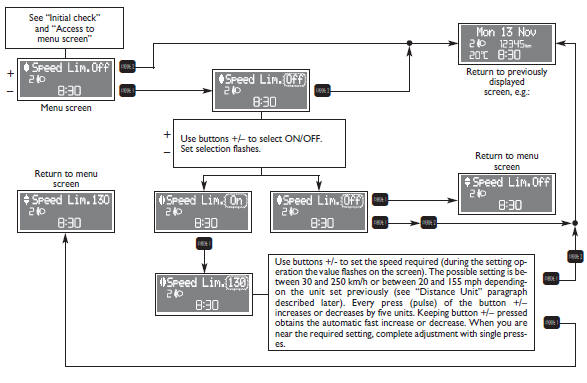
With this function it is possible to set the car speed limit which, if
exceeded, automatically sounds a buzzer and
makes the warning light  with the special message on the display (see “Warning
lights and messages” section) come
on to alert the driver. To set the speed limit, proceed as follows:


Other info:
Renault Clio. Headlight adjustment
On vehicles fitted with this function,
control A allows you to adjust the height
of the beams according to the load.
Turn control A downwards to lower the
headlights and upwards to raise the ...
Chevrolet Sonic. Interior Lighting
Dome Lamps
The dome lamp controls are in the headliner above the rear seats.
: Press to turn the lamps off, even
when a door is open.
: When the button is returned to
the middle position, t ...
Skoda Fabia. Boot
Please observe the following for the purpose of maintaining good handling
characteristics of your vehicle:
Distribute loads as evenly as possible.
Place heavy objects as far forward as possible ...
Manuals For Car Models
-
 Chevrolet Sonic
 -
 Citroen C3
 -
 Fiat Punto
 -
 Honda Fit
 -
 Mazda 2
 -
 Nissan Micra
 -
 Peugeot 208
 -
 Renault Clio
 -
 Seat Ibiza
 -
 Skoda Fabia
 - Honda Pilot
- Volkswagen ID4
- Toyota Prius
