

Honda Fit: Adjusting the Sound
Honda Fit Owners Manual
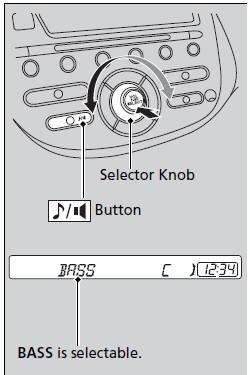
Press the  (sound) button, and
rotate 
to adjust the setting.
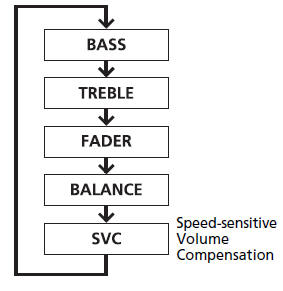
Each time you press the  button, a
sound
mode switches as follows.
When the adjustment level reaches the center, you will see C in the display.
The SVC has four modes: OFF, LOW, MID, and HIGH.
SVC adjusts the volume level based on the vehicle speed. As you go faster, audio volume increases. As you slow down, audio volume decreases.


Other info:
Peugeot 208. 6-speed electronic gear control gearbox
Six-speed electronic gear control gearbox which offers a choice between the comfort
of fully automatic operation or the pleasure of manual gear changing.
There are two driving modes:
- automated m ...
Chevrolet Sonic. Personalization Menu (Radio with Touchscreen)
Settings can be made with the ignition ON and the vehicle not moving.
Use the audio system controls to access the personalization menus for customizing
vehicle features.
The following are all poss ...
Chevrolet Sonic. Tire Pressure Monitor
This vehicle may have a Tire Pressure Monitor System (TPMS).
The low tire pressure warning light alerts to a significant loss in pressure
of one of the vehicle's tires. If the warning light comes ...
Manuals For Car Models
-
 Chevrolet Sonic
 -
 Citroen C3
 -
 Fiat Punto
 -
 Honda Fit
 -
 Mazda 2
 -
 Nissan Micra
 -
 Peugeot 208
 -
 Renault Clio
 -
 Seat Ibiza
 -
 Skoda Fabia
 - Honda Pilot
- Volkswagen ID4
- Toyota Prius
