

Honda Fit: Audio System Basic Operation
Honda Fit Owners Manual
To use the audio system function, the ignition switch must be in ACCESSORY
 or
or
ON  .
.
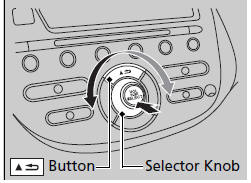
Use the selector knob to access some audio functions.
Selector knob: Rotate left or right to scroll
through the available choices. Press 
to set
your selection.
 button: Press to go back to the
previous
display.
These indications are used to show how to operate the selector knob.
Rotate  to select.
Press  to enter.


Other info:
Honda Fit. Compatible iPod® and USB Flash Drives
iPod® Model Compatibility
This system may not work with all software versions
of these devices.
USB Flash Drives
• Use a recommended USB flash drive of 256 MB or higher.
• Some digital aud ...
Chevrolet Sonic. Engine Coolant Temperature Warning Light
This light comes on briefly while starting the vehicle.
If it does not, have the vehicle serviced by the dealer. If the system is working
normally the indicator light goes off.
Caution
The engi ...
Chevrolet Sonic. Mirror Adjustment
Exterior Mirrors
Manual Outside Mirrors
Move the control up, down, or side to side to adjust the mirror.
See Manual Mirrors.
Power Outside Mirrors
For vehicles with power outside mirrors:
1. ...
Manuals For Car Models
-
 Chevrolet Sonic
 -
 Citroen C3
 -
 Fiat Punto
 -
 Honda Fit
 -
 Mazda 2
 -
 Nissan Micra
 -
 Peugeot 208
 -
 Renault Clio
 -
 Seat Ibiza
 -
 Skoda Fabia
 - Honda Pilot
- Volkswagen ID4
- Toyota Prius
