

Honda Fit: Customizing the Auto Door Locking/Unlocking Setting
Honda Fit Owners Manual
You can customize the auto door locking/unlocking setting to your liking using the master door lock switch.
List of the Auto Door Locking/Unlocking Customizable Options
■ Auto door locking

■ Auto door unlocking
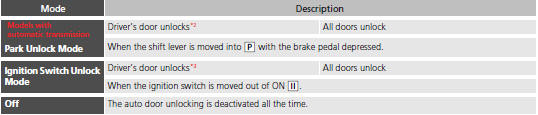
*1: Default setting
*2: Default setting for automatic transmission models
*3: Default setting for manual transmission model
Customizing Flow for Auto Door Locking Options
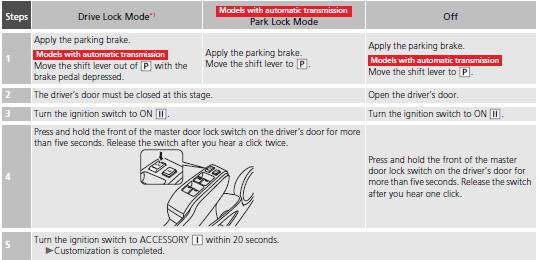
*1: Default setting
Customizing Flow for Auto Door Unlocking Options
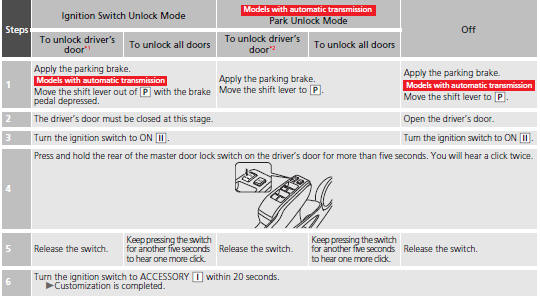
*1: Default setting for manual transmission models *2: Default setting for automatic transmission models


Other info:
Honda Fit. Brightness Control
When the parking lights are turned on and the
ignition switch is in ON , you can
use the
(select/reset) knob to adjust
instrument
panel brightness.
Brighten: Turn the knob to the right.
...
Nissan Micra. Tachometer
The tachometer indicates engine speed in revolutions
per minute (rpm). Do not rev the engine
into the red zone 1 .
CAUTION
When engine speed approaches the red
zone, shift to a hig ...
Nissan Micra. Rear hatch (Hatchback)
WARNING
The rear hatch must be closed securely
before driving. An open rear hatch could
allow dangerous exhaust gases to be
drawn inside the vehicle. For additional
information, ...
Manuals For Car Models
-
 Chevrolet Sonic
 -
 Citroen C3
 -
 Fiat Punto
 -
 Honda Fit
 -
 Mazda 2
 -
 Nissan Micra
 -
 Peugeot 208
 -
 Renault Clio
 -
 Seat Ibiza
 -
 Skoda Fabia
 - Honda Pilot
- Volkswagen ID4
- Toyota Prius
