

Honda Fit: Heating and Cooling
Honda Fit Owners Manual
Using Vents, Heating and A/C
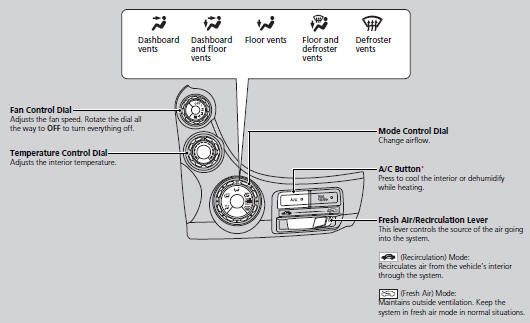
■Heating
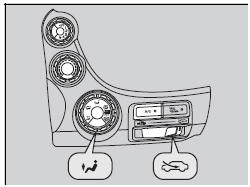
The heater uses heat from the engine coolant to warm the air.
1. Adjust the fan speed using the fan control dial.
2. Select  and
and
 .
.
3. Adjust the temperature using the
temperature control dial.
■ To rapidly warm up the interior
1. Set the fan to the maximum speed.
2. Select .
3. Set the temperature to maximum heat.
4. Select  .
.
Change to fresh air mode as soon as the interior gets warm enough. The windows may fog up if kept in recirculation mode.
■ To dehumidify the interior*
When used in combination with the heater, the air conditioning system makes the interior warm and dry and can prevent the windows from fogging up.
1. Turn the fan on.
2. Press the A/C button to turn on the air conditioning.
3. Select and
. Adjust the temperature to your
preference.
■Cooling
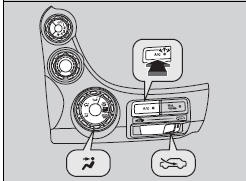
1. Adjust the fan speed using the fan control dial.
2. Select  and
.
and
.
3. Adjust the temperature using the
temperature control dial.
4. Press the A/C button (the indicator on).
■ To rapidly cool down the interior
1. Set the fan to the maximum speed.
2. Set the temperature to maximum cool.
3. Select .
If the interior is very warm, you can cool it down more rapidly by partially opening the windows.
■Defrosting the Windshield and Windows
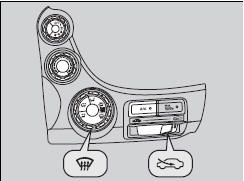
1. Select  turns the air
conditioning system
on.
2. Select .
■ To rapidly defrost the windows
1. Set the fan to the maximum speed.
2. Select  .
.
3. Select .
4. Set the temperature to maximum heat.
For your safety, make sure you have a clear view through all the windows before driving
.
Do not set the temperature near the upper or lower limit.
When cold air hits the windshield, the outside of the windshield may fog up.
If the side windows fog up, adjust the vents so that the air hits the side windows.
After defrosting the windows, switch over to fresh air mode.
If you keep the system in recirculation mode, the windows may fog up from humidity. This impedes visibility.


Other info:
Fiat Punto. Jump starting
If the battery is flat, it is possible to start the engine using an auxiliary
battery with the same capacity or a little higher than the flat one.
Proceed as follows:
Connect positive terminal ...
Nissan Micra. FM radio reception
Range: FM range is normally limited to 40 –
48 km (25 – 30 mi) with monaural (single channel)
FM having slightly more range than stereo
FM. External influences may sometimes interfere
with FM ...
Seat Ibiza. General notes
The pollen filter
The pollution filter (a combined particulate filter and active carbon filter)
serves as a barrier against impurities in the ambient air, including dust and pollen.
For the air c ...
Manuals For Car Models
-
 Chevrolet Sonic
 -
 Citroen C3
 -
 Fiat Punto
 -
 Honda Fit
 -
 Mazda 2
 -
 Nissan Micra
 -
 Peugeot 208
 -
 Renault Clio
 -
 Seat Ibiza
 -
 Skoda Fabia
 - Honda Pilot
- Volkswagen ID4
- Toyota Prius
