

Honda Fit: Tire Rotation
Honda Fit Owners Manual
Rotating tires according to the Maintenance Minder message on the information display helps to distribute wear more evenly and increase tire life.
■ Tires without rotation marks
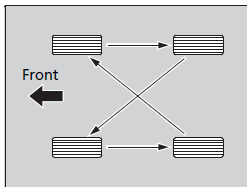
Rotate the tires as shown here.
■ Tires with rotation marks
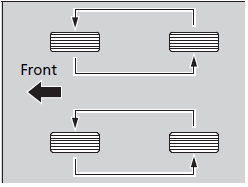
Rotate the tires as shown here.
Tires with directional tread patterns should only be rotated front to back (not from one side to the other).
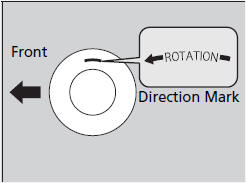
Directional tires should be mounted with the rotation indication mark facing forward, as shown below.


Other info:
Seat Ibiza. Heating and ventilation
Controls
Fig. 91 On the dash panel: Heater controls
– Using the controls ⇒ fig. 91 and
and with the switch
you can set the temperature, air distribution
and the blower speed. – Pre ...
Honda Fit. Fuse Locations
If any electrical devices are not working, turn the ignition switch to LOCK
(0 and
check to see if any applicable fuse is blown.
Fuse locations are shown on the fuse box cover. Locate the fuse i ...
Peugeot 208. Access to the spare wheel
The spare wheel is installed in the boot under the floor.
According to country, the spare wheel may be steel, alloy or of the "space-saver"
type. To gain access to it, refer to the para ...
Manuals For Car Models
-
 Chevrolet Sonic
 -
 Citroen C3
 -
 Fiat Punto
 -
 Honda Fit
 -
 Mazda 2
 -
 Nissan Micra
 -
 Peugeot 208
 -
 Renault Clio
 -
 Seat Ibiza
 -
 Skoda Fabia
 - Honda Pilot
- Volkswagen ID4
- Toyota Prius
