

Nissan Micra: Power windows (if so equipped)
Nissan Micra Owners Manual
WARNING
|
The power windows operate when the ignition switch is placed in the ON position, or for a period of time after the ignition switch is placed in the OFF position. If the driver’s or passenger’s door is opened during this period of time, the power to the windows is canceled.
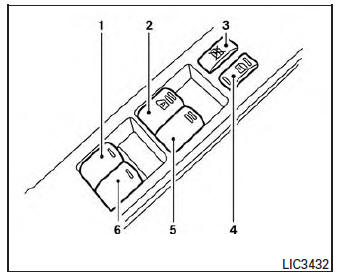
- Left rear passenger’s window switch
- Driver’s side automatic switch
- Window lock button
- Power door lock switch
- Front passenger’s side window switch
- Right rear passenger’s window switch
Driver’s side power window switch
The driver’s side control panel is equipped with switches to open or close the front and rear passenger windows.
To open a window, push the switch and hold it down. To close a window, pull the switch and hold it up. To stop the opening or closing function at any time, simply release the switch.
Front passenger’s power window switch
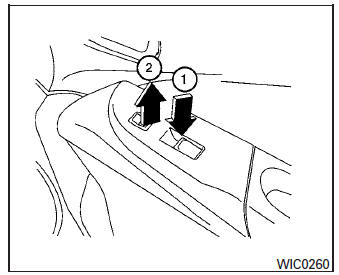
The passenger’s window switch operates only the corresponding passenger’s window. To open the window, push the switch and hold it down 1 .
To close the window, pull the switch up 2 .
Rear power window switch
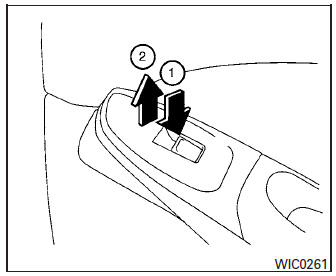
The rear power window switches open or close only the corresponding windows. To open the window, push the switch and hold it down 1 . To close the window, pull the switch up 2 .
Locking passengers’ windows
When the window lock switch is depressed, only the driver’s side window can be opened or closed. Push it again to cancel the window lock function.
Automatic operation
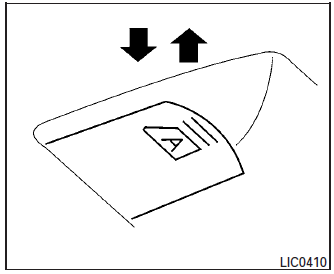
To fully open a window equipped with automatic operation, push the window switch down to the second detent and release it; it need not be held.
The window automatically opens all the way. To stop the window, lift the switch up while the window is opening.


Other info:
Chevrolet Sonic. Engine Oil Life System
The engine oil life system calculates engine oil life based on vehicle use and
displays the %CHANGE message on the
DIC when it is necessary to change the engine oil and filter.
Remember, the oil ...
Citroen C3. Airbags
System designed to maximise the safety
of the occupants (with the exception of
the rear centre passenger) in the event
of violent collisions. It supplements the
action of the force-limiting se ...
Ford Fiesta. Vehicle Care
Cleaning Products
For best results, use the following products
or products of equivalent quality:
Motorcraft Bug and Tar Remover (ZC-42)
Motorcraft Custom Bright Metal Cleaner
(ZC-15)
Motorcraft Detai ...
Manuals For Car Models
-
 Chevrolet Sonic
 -
 Citroen C3
 -
 Fiat Punto
 -
 Honda Fit
 -
 Mazda 2
 -
 Nissan Micra
 -
 Peugeot 208
 -
 Renault Clio
 -
 Seat Ibiza
 -
 Skoda Fabia
 - Honda Pilot
- Volkswagen ID4
- Toyota Prius
