

Nissan Micra: Rearview mirror
Nissan Micra Owners Manual
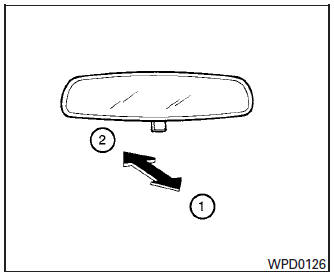
The night position 1 reduces glare from the headlights of vehicles behind you at night.
Use the day position 2 when driving in daylight hours.
| WARNING Use the night position only when necessary, because it reduces rear view clarity. |


Other info:
Nissan Micra. Flat tire
CHANGING A FLAT TIRE
If you have a flat tire, follow the instructions below:
Stopping the vehicle
Safely move the vehicle off the road and
away from traffic.
Turn on the hazard warning flash ...
Renault Clio. Bonnet
To open the bonnet, pull the handle 1.
Before performing any
action in the engine compartment,
the ignition must
be switched off by pressing
the engine stop button (please see
...
Mazda 2. Meters and Gauges
Speedometer
Odometer, Trip Meter and Trip Meter Selector
Tachometer
Fuel Gauge
Instrument panel Illumination
Outside Temperature Display
Cruise Control Set Vehicle Speed Display
A ...
Manuals For Car Models
-
 Chevrolet Sonic
 -
 Citroen C3
 -
 Fiat Punto
 -
 Honda Fit
 -
 Mazda 2
 -
 Nissan Micra
 -
 Peugeot 208
 -
 Renault Clio
 -
 Seat Ibiza
 -
 Skoda Fabia
 - Honda Pilot
- Volkswagen ID4
- Toyota Prius
