

Peugeot 208: LCD instrument panel
Peugeot 208 Owners Manual
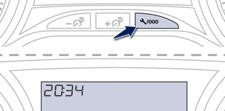
Press this button to display the following settings successively:
- hours,
- minutes,
- 12 or 24 hour format


Other info:
Chevrolet Sonic. Roof
Sunroof
On vehicles with this feature, the sunroof only operates when the ignition is
turned to ON/RUN or Retained Accessory Power (RAP) is active.
Open/Close: To open the sunroof, press and hol ...
Renault Clio. Passenger compartment storage space and fittings
Front door storage pockets 1
They can hold a 1.5 litre bottle.
Nothing should be placed
on the floor area in front of
the driver as such objects
may slide under the pedal
duri ...
Citroen C3. Headlamp adjustment
To avoid causing a nuisance to other
road users, the height of the headlamps
should be adjusted in relation to the load
in the vehicle.
0 . 1 or 2 people in the front seats.
-. 3 people.
...
Manuals For Car Models
-
 Chevrolet Sonic
 -
 Citroen C3
 -
 Fiat Punto
 -
 Honda Fit
 -
 Mazda 2
 -
 Nissan Micra
 -
 Peugeot 208
 -
 Renault Clio
 -
 Seat Ibiza
 -
 Skoda Fabia
 - Honda Pilot
- Volkswagen ID4
- Toyota Prius
