

Peugeot 208: Programming
Peugeot 208 Owners Manual
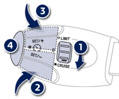
Turn thumb wheel 1 to the "CRUISE" position: the cruise control mode is selected but is not switched on (PAUSE).
Set the programmed speed by accelerating to the required speed, then press button 2 or 3 (e.g.: 70 mph (110 km/h)).
You can then change the programmed speed using buttons 2 and 3:
- by + or - 1 mph (km/h) = short press, - by + or - 5 mph (km/h) = long press, - in steps of + or - 5 mph (km/h) = maintained press.
Switch off the cruise control by pressing button 4 : the screen confirms that it has been switched off (PAUSE).
Switch the cruise control back on by pressing button 4 again.


Other info:
Nissan Micra. When traveling or registering in another country
When planning to drive your NISSAN vehicle
in another country, you should first find
out if the fuel available is suitable for your vehicle’s
engine.
Using fuel with an octane rating that is t ...
Chevrolet Sonic. Automatic Door Locks
The vehicle is programmed so that when the doors are closed, the ignition is
on, and the shift lever is moved out of P (Park) for automatic transmissions, or
when the vehicle speed is above 13 km/ ...
Seat Ibiza. Cruise control system (CCS)
Description
The cruise control system is able to maintain the set speed in the range from
approx. 30 km/h to 180 km/h. Once the speed setting has been saved, you may take
your foot off the accele ...
Manuals For Car Models
-
 Chevrolet Sonic
 -
 Citroen C3
 -
 Fiat Punto
 -
 Honda Fit
 -
 Mazda 2
 -
 Nissan Micra
 -
 Peugeot 208
 -
 Renault Clio
 -
 Seat Ibiza
 -
 Skoda Fabia
 - Honda Pilot
- Volkswagen ID4
- Toyota Prius
