

Peugeot 208: Trip reset
Peugeot 208 Owners Manual
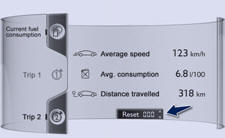
 When the desired trip
is displayed, press the reset zone, located at bottom right of the touch screen.
Trips "1" and "2" are independent but their use is identical.
For example, trip "1" can be used for daily figures, and trip "2" for monthly figures.


Other info:
Chevrolet Sonic. Wheel Replacement
Replace any wheel that is bent, cracked, or badly rusted or corroded. If wheel
nuts keep coming loose, the wheel, wheel bolts, and wheel nuts should be replaced.
If the wheel leaks air, replace it ...
Fiat Punto. Fluids and lubricants
RECOMMENDED PRODUCTS AND THEIR SPECIFICATIONS
For diesel engines, in emergency cases where genuine products are not
available, lubricants with min. performance ACEA C2 are accepted. If
this is ...
Seat Ibiza. How are the figures measured?
Fuel consumption
The consumption and emission details shown on the vehicle data sticker differ
from one vehicle to another.
The fuel consumption and CO2 emissions of the vehicle can be found on th ...
Manuals For Car Models
-
 Chevrolet Sonic
 -
 Citroen C3
 -
 Fiat Punto
 -
 Honda Fit
 -
 Mazda 2
 -
 Nissan Micra
 -
 Peugeot 208
 -
 Renault Clio
 -
 Seat Ibiza
 -
 Skoda Fabia
 - Honda Pilot
- Volkswagen ID4
- Toyota Prius
