

Chevrolet Sonic: Overview (AM-FM Radio)
Chevrolet Sonic Owners Manual
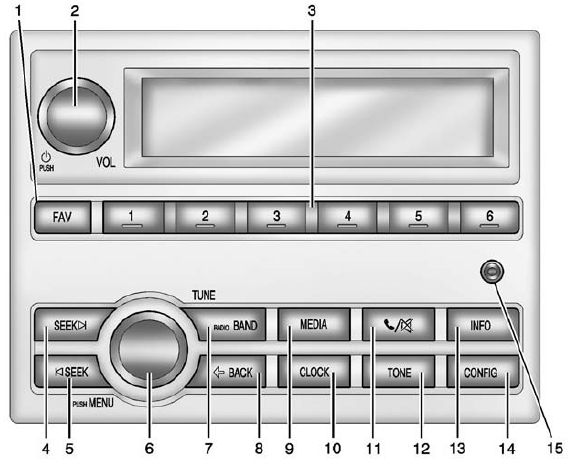
1. FAV (Favorites)
- Radio: Opens the favorites list.
2.  /VOL (Power/Volume)
- Turns the system on or off and adjusts the volume.
3. Buttons 1−6
- Radio: Saves and selects favorite stations.
4. SEEK 
- Radio: Seeks the next station.
- CD: Selects the next track or fast forwards within a track.
5.  SEEK
SEEK
- Radio: Seeks the previous station.
- CD: Selects the previous track or rewinds within a track.
6. Push/MENU/TUNE
- Radio: Manually selects radio stations.
- CD: Selects tracks.
7. RADIO/BAND
- Changes the band while listening to the radio.
- Selects the radio when listening to a different audio source.
8.  BACK
BACK
- Menu: Moves one level back.
- Character Input: Deletes the last character.
9. MEDIA
- Selects external audio source.
10. CLOCK
- Opens the Clock menu.
11.  (Phone Mute)
- Mutes the audio system.
12. TONE
- Opens the Tone menu.
13. INFO (Information)
- Radio: Shows available information about the current station.
- CD: Shows available information about the current track.
14. CONFIG (Configuration)
- Opens the Configuration menu.
15. AUX Port
- 3.5 mm (1/8 in) connection for external devices.


Other info:
Mazda 2. Troubleshooting
Mazda Bluetooth ® Hands-Free Customer Service
If you have any problems with Bluetooth ® , contact our toll-free customer
service centre.
Phone:
(Germany)
0800 4263 738 (8:00—18:00 Central ...
Citroen C3. Automatic air conditioning
The air conditioning can only operate
when the engine is running.
Automatic operation
1. Automatic "comfort" programme
Press the "AUTO" button. The
"AUTO" symb ...
Fiat Punto. Driving mirror
The mirror is fitted with a safety device that causes it to be released in
the event of a violent crash.
Using the lever (A) it can be moved to two different positions: normal or
antiglare.
...
Manuals For Car Models
-
 Chevrolet Sonic
 -
 Citroen C3
 -
 Fiat Punto
 -
 Honda Fit
 -
 Mazda 2
 -
 Nissan Micra
 -
 Peugeot 208
 -
 Renault Clio
 -
 Seat Ibiza
 -
 Skoda Fabia
 - Honda Pilot
- Volkswagen ID4
- Toyota Prius
