Fiat Punto: Controls
Fiat Punto Owners Manual
HAZARD LIGHTS
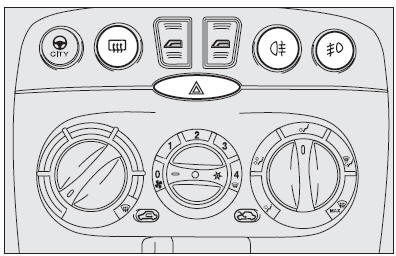
They come on when switch  is
is
pressed regardless of the position of
the ignition key.
When the device is on, the switch is flashing and warning lights
 and
and

on the cluster come on.
Press the switch again to turn the lights off.
FRONT FOG LIGHTS (where provided)
Press button  ; to activate these
lights it is necessary to have the
side/taillights switched on and warning light
 on the cluster come on.
Press the button again to turn these lights off.
REAR FOG LIGHT
Press button  ; to activate this
light it is necessary to have the dipped
beam headlights switched onand warning light
 on the cluster come on.
Press the button again to turn these lights off.
HEATED REAR WINDOW
Press button  to turn it on. The
device is automatically switched off
after about 20 minutes.
 The use of hazard The use of hazard
lights is governed by the Road Traffic Code of the country you are in. Keep to the rules. |
FUEL CUT-OFF SWITCH (FIS)
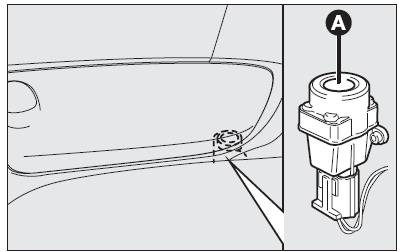
It is located under the dashboard on the front right-hand door pillar and it comes into operation in the case of an accident to block the supply of fuel thereby stopping the engine.
Carefully inspect the car to find fuel leaks, e.g. in the engine compartment, under the car or near the tank.
If no fuel leaks are found and the car can be started again, press button (A) to reset the fuel system and the lights.
After a crash, remember to turn the ignition key to STOP to prevent battery run-down.
 If, after a crash, you If, after a crash, you
smell fuel or see leaks from the fuel system, do not reset the switch to avoid fire risk. |


Other info:
Nissan Micra. Air flow charts
The following charts show the button and dial
positions for MAXIMUM AND QUICK heating,
cooling or defrosting. The air intake lever
should always be in the position for
heating and defrosting.
...
Chevrolet Sonic. Starting Procedure
1. With your foot off the accelerator pedal, turn the ignition to START. When
the engine cranks, let go of the key. The idle speed will go down as the engine
gets warm.
The vehicle has a Computer ...
Renault Clio. Fuel tank (filling with fuel)
Useful capacity of fuel tank: approx.
45 litres.
The engine 0,9 TCe has a fuel tank capacity
of 40 litres or 45 litres (depending
on the vehicle).
To open cover A, place your finger int ...
Manuals For Car Models
-
 Chevrolet Sonic
 -
 Citroen C3
 -
 Fiat Punto
 -
 Honda Fit
 -
 Mazda 2
 -
 Nissan Micra
 -
 Peugeot 208
 -
 Renault Clio
 -
 Seat Ibiza
 -
 Skoda Fabia
 - Honda Pilot
- Volkswagen ID4
- Toyota Prius
