

Honda Fit: Adjusting the Sound
Honda Fit Owners Manual
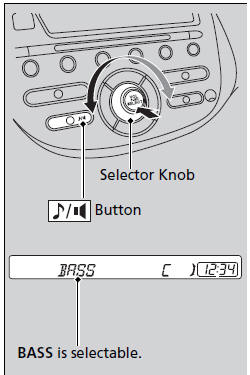
Press the  (sound) button, and
rotate 
to adjust the setting.
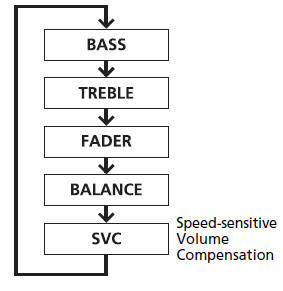
Each time you press the  button, a
sound
mode switches as follows.
When the adjustment level reaches the center, you will see C in the display.
The SVC has four modes: OFF, LOW, MID, and HIGH.
SVC adjusts the volume level based on the vehicle speed. As you go faster, audio volume increases. As you slow down, audio volume decreases.


Other info:
Peugeot 208. Oil level
The check is carried out either when the ignition is switched on using the oil
level indicator on the instrument panel, or using the dipstick.
This manual check will only be correct if the vehicl ...
Peugeot 208. Manual controls
The wipers are controlled directly by the driver.
Model without AUTO wiping
Model with AUTO wiping
Windscreen wipers
Wiping speed:
Rear wiper
Rear wiper selection ring:
park,
intermi ...
Peugeot 208. Operation
On an ascending slope, with the vehicle stationary, the vehicle is held for a
brief moment when you release the brake pedal:
- if you are in first gear or neutral with a manual gearbox,
- if you ...
Manuals For Car Models
-
 Chevrolet Sonic
 -
 Citroen C3
 -
 Fiat Punto
 -
 Honda Fit
 -
 Mazda 2
 -
 Nissan Micra
 -
 Peugeot 208
 -
 Renault Clio
 -
 Seat Ibiza
 -
 Skoda Fabia
 - Honda Pilot
- Volkswagen ID4
- Toyota Prius
