
Honda Fit: How to Refuel
Honda Fit Owners Manual
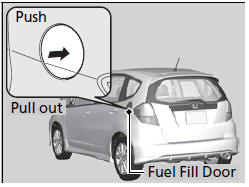
1. Stop your vehicle with the service station pump on the left side of the vehicle in the rear.
2. Turn off the engine.
3. Press the area indicated by the arrow to release the fuel fill door. You will hear a click.
WARNING
Gasoline is highly flammable and explosive.
You can be burned or seriously injured when handling fuel.
• Stop the engine, and keep heat, sparks, and flame away.
• Handle fuel only outdoors.
• Wipe up spills immediately.
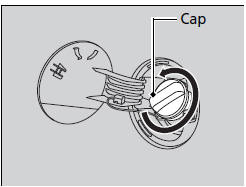
4. Remove the fuel fill cap slowly. If you hear a release of air, wait until this stops, then turn the knob slowly to open the fuel fill cap.
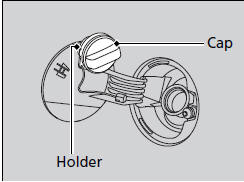
5. Place the fuel fill cap in the holder.
6. Insert the filler nozzle fully.
► When the tank is full, the fuel nozzle will click off automatically. This leaves space in the fuel tank in case the fuel expands with a change in the temperature.
7. After filling, replace the fuel fill cap, tightening it until you hear it click at least once.
► Shut the fuel fill door by hand.
The filler nozzle automatically stops to leave space in the fuel tank so that fuel does not overflow as a result of changes in air temperature.
If the filler nozzle keeps turning off when the tank is not full, there may be a problem with the pump’s fuel vapor recovery system. Try filling at another pump. If this does not fix the problem, consult a dealer.
Do not continue to add fuel after the nozzle has automatically stopped. Additional fuel can exceed the full tank capacity.


Other info:
Honda Fit. Playing the FM/AM Radio
■Radio Data System (RDS)
Provides text data information related to your selected RDS capable FM
station.
■ RDS INFO ON
Press the TITLE button while listening to an RDS capable stati ...
Nissan Micra. FM/AM radio with compact disc (CD) player (Type A) (if so equipped)
For additional information, refer to “Audio operation
precautions” in this section.
CD eject button
CD insert slot
SCAN button
DISP button
RPT/RDM button
TUNE/FOLDER knob / MEN ...
Mazda 2. Seat Belt Pretensioner and Load Limiting Systems
For optimum protection, the front seat
belts and rear outboard seat belts * are
equipped with pretensioner and load
limiting systems. For both these systems to
work properly you must wear the seat ...
Manuals For Car Models
-
 Chevrolet Sonic
 -
 Citroen C3
 -
 Fiat Punto
 -
 Honda Fit
 -
 Mazda 2
 -
 Nissan Micra
 -
 Peugeot 208
 -
 Renault Clio
 -
 Seat Ibiza
 -
 Skoda Fabia
 - Honda Pilot
- Volkswagen ID4
- Toyota Prius
