
Peugeot 208: Interior fittings
Peugeot 208 Owners Manual
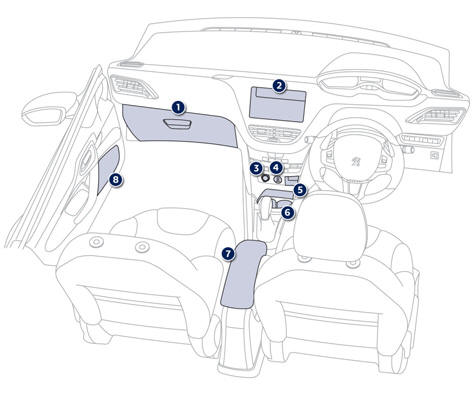
1. Glove box (see details on the following page) 2. Large storage compartment (without audio system) 3. 12 V accessory socket (120 W) Observe the maximum power rating to avoid damaging your accessory.
4. USB port / Auxiliary socket (see details on following pages)
5. Open storage compartments
6. Cup holder
7. Central armrest
8. Door pockets


Other info:
Honda Fit. Precautions for Opening/Closing the Tailgate
Always make sure individuals and objects are clear of the tailgate before
opening or
closing it.
■ Opening the tailgate
• Open the tailgate all the way.
►If it is not fully opened, ...
Nissan Micra. Hood
Pull the hood lock release handle 1 located
below the instrument panel until the hood
springs up slightly.
Locate the lever 2 in between the hood and
grille and push the lever sideways ...
Renault Clio. Front headrests
To raise the headrest
Pull the headrest upwards to the desired
height. Check that it is correctly
locked.
To lower the headrest
Press button 1 and guide the headrest
down to the desired heig ...
Manuals For Car Models
-
 Chevrolet Sonic
 -
 Citroen C3
 -
 Fiat Punto
 -
 Honda Fit
 -
 Mazda 2
 -
 Nissan Micra
 -
 Peugeot 208
 -
 Renault Clio
 -
 Seat Ibiza
 -
 Skoda Fabia
 - Honda Pilot
- Volkswagen ID4
- Toyota Prius
