
Peugeot 208: Locking / unlocking from the inside
Peugeot 208 Owners Manual
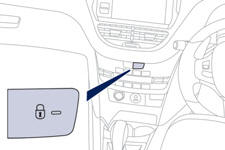
Press the switch.
This allows the doors and the boot to be locked or unlocked.
If one of the doors is open, the doors are not locked.
When locking / deadlocking from outside
When the vehicle is locked or deadlocked from outside, the switch does not operate.
- After normal locking, pull the interior door lever to unlock the vehicle.
- After deadlocking, you have to use the remote control or the key to unlock the vehicle.
Automatic central locking of the doors
The doors can lock automatically while driving (speed above 6 mph [10 km/h]).
To turn this function on or off (on by default).
press and hold the button until there is an audible signal and/or a message in the screen.
Driving with the doors locked may make access to the passenger compartment by the emergency services more difficult in an emergency.


Other info:
Ford Fiesta. Audio System
General Information
Radio Frequencies and Reception Factors
CD and CD Player Information
Note: CD units play commercially pressed
4.75-inch (12 centimeter) audio compact
discs only. Due to technical ...
Skoda Fabia. Service Interval Display
A message concerning the kilometres and days remaining until the next
service is due is shown for about 10 seconds after the ignition is switched on
until the end of the service interval is reached. ...
Chevrolet Sonic. Rocking the Vehicle to Get it Out
Turn the steering wheel left and right to clear the area around the front wheels.
Turn off any traction system. Shift back and forth between R (Reverse) and a low
forward gear, spinning the wheels ...
Manuals For Car Models
-
 Chevrolet Sonic
 -
 Citroen C3
 -
 Fiat Punto
 -
 Honda Fit
 -
 Mazda 2
 -
 Nissan Micra
 -
 Peugeot 208
 -
 Renault Clio
 -
 Seat Ibiza
 -
 Skoda Fabia
 - Honda Pilot
- Volkswagen ID4
- Toyota Prius
