

Peugeot 208: Dimensions (in mm)
Peugeot 208 Owners Manual
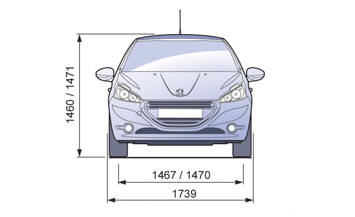
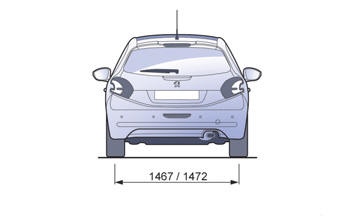
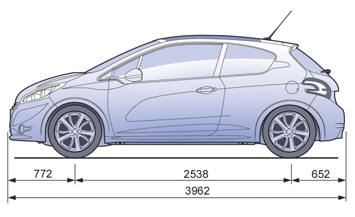
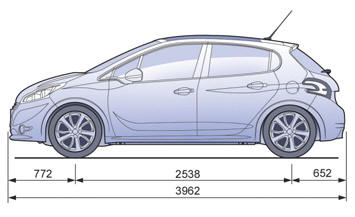


Other info:
Mazda 2. Engine Oil
NOTE
Changing the engine oil should be done by an expert repairer, we recommend
an
Authorised Mazda Repairer.
Recommended Oil
In order to keep the maintenance interval (page 6-3 ) and to protect ...
Skoda Fabia. Vehicle identification data
Fig. 164 Vehicle data sticker/type plate
Vehicle data sticker
The vehicle data sticker » Fig. 164 - A is located on the base of the luggage
compartment and is also fixed into the service sched ...
Honda Fit. VSA® (Vehicle Stability Assist), aka ESC (Electronic Stability Control),
System
VSA® helps to stabilize the vehicle during cornering if the vehicle turns
more or less
than what was intended. It also assists in maintaining traction on slippery
surfaces.
It does so by regu ...
Manuals For Car Models
-
 Chevrolet Sonic
 -
 Citroen C3
 -
 Fiat Punto
 -
 Honda Fit
 -
 Mazda 2
 -
 Nissan Micra
 -
 Peugeot 208
 -
 Renault Clio
 -
 Seat Ibiza
 -
 Skoda Fabia
 - Honda Pilot
- Volkswagen ID4
- Toyota Prius
