

Chevrolet Sonic: How to Reset the Engine Oil Life System
Chevrolet Sonic Owners Manual
Reset the system whenever the engine oil is changed so that the system can calculate the next engine oil change. To reset the system:
1. Press the MENU button to show Remaining Oil Life on the display. This display shows an estimate of the oil’s remaining useful life. If 99% is displayed, that means that 99% of the current oil life remains.
2. To reset the engine oil life system, press the SET/CLR button while the oil life display is active. After a few seconds, there will be a single chime and the oil life will be reset to 100%.
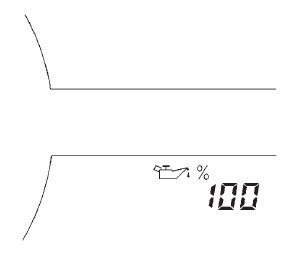
Be careful not to reset the oil life display accidentally at any time other than after the oil is changed. It cannot be reset accurately.
If the  %CHANGE message in the DIC
comes back on when the vehicle is started, the engine oil life system has not reset.
Repeat the procedure.


Other info:
Seat Ibiza. Belt tension devices
Function of the belt tension device
During a frontal collision, the seat belts on the front seats are retracted automatically.
The seat belts for the front occupants are equipped with belt tension ...
Chevrolet Sonic. Bluetooth (Overview)
For vehicles equipped with Bluetooth capability, the system can interact with
many cell phones, allowing:
Placement and receipt of calls in a hands-free mode.
Sharing of the cell phone’s add ...
Seat Ibiza. Overview
Overview of the instrument panel
This overview will help you to familiarise yourself with the controls and displays.
1. Door release lever
2. Air vent
3. Light switch
4. Light dimmer for instrume ...
Manuals For Car Models
-
 Chevrolet Sonic
 -
 Citroen C3
 -
 Fiat Punto
 -
 Honda Fit
 -
 Mazda 2
 -
 Nissan Micra
 -
 Peugeot 208
 -
 Renault Clio
 -
 Seat Ibiza
 -
 Skoda Fabia
 - Honda Pilot
- Volkswagen ID4
- Toyota Prius
