

Citroen C3: Audible and/or visual rear parking assistance
Citroen C3 Owners Manual
This system consists of four proximity sensors, located in the rear bumper.
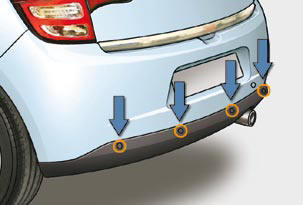
This detects any obstacle (person, vehicle, tree, gate, etc.) behind the vehicle, except obstacles located just below the bumper.
An object, such as a stake, a roadworks cone or any other similar object may be detected at the beginning of the manoeuvre, but may no longer be detected when the vehicle comes close to it.
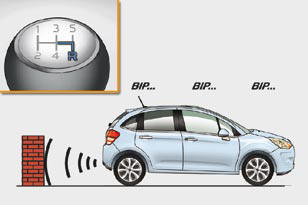
Detection zone
Activation
The system is activated as soon as reverse gear is engaged, accompanied by an audible signal.
The proximity information is given by:
- an audible signal, which becomes
more rapid as the vehicle approaches
the obstacle,
- a graphic on the multifunction
screen, with blocks which become
increasingly closer to the vehicle.
When the distance between the rear of the vehicle and the obstacle is less than thirty centimetres, the audible signal becomes continuous and the "Danger" symbol appears on the multifunction screen.
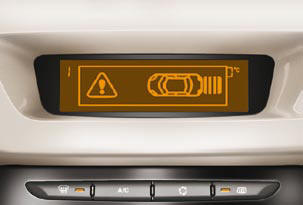
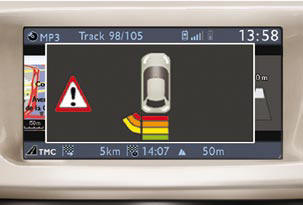
On completion of the manoeuvre, when you exit reverse gear, the system becomes inactive.
The rear parking assistance system cannot, in any circumstances, take the place of the vigilance and responsibility of the driver.
Programming
You can activate or deactivate the system by means of the multifunction screen confi guration menu. The system state is memorised when switching off the ignition.
The system will be deactivated automatically when towing a trailer or when a bicycle carrier is fi tted (vehicle fi tted with a towbar or bicycle carrier recommended by CITROËN).
Operating faults
If there is an operating fault, when reverse gear is engaged the service warning lamp comes on, accompanied by an audible signal (short beep) and a message on the multifunction screen.
In bad or wintry weather, ensure that the sensors are not covered with mud, frost or snow.


Other info:
Chevrolet Sonic. Call Waiting
Call waiting must be supported on the Bluetooth phone and enabled by the wireless
service carrier to work.
Accepting a Call
Turn the Push/MENU/TUNE knob to “Answer” and press the Push/ MENU/TU ...
Chevrolet Sonic. Forward Collision Alert (FCA) System
For vehicles with this feature, read the following section before using it.
The Forward Collision Alert (FCA) system may help to avoid or reduce the harm
caused by front-end crashes. FCA provides a ...
Peugeot 208. Starting using another battery
Connect the red cable to the positive terminal (+) of the flat battery A
, then to the positive terminal (+) of the slave battery B.
Connect one end of the green or black cable to the negati ...
Manuals For Car Models
-
 Chevrolet Sonic
 -
 Citroen C3
 -
 Fiat Punto
 -
 Honda Fit
 -
 Mazda 2
 -
 Nissan Micra
 -
 Peugeot 208
 -
 Renault Clio
 -
 Seat Ibiza
 -
 Skoda Fabia
 - Honda Pilot
- Volkswagen ID4
- Toyota Prius
