

Citroen C3: Petrol - diesel manual gearbox instrument panels
Citroen C3 Owners Manual
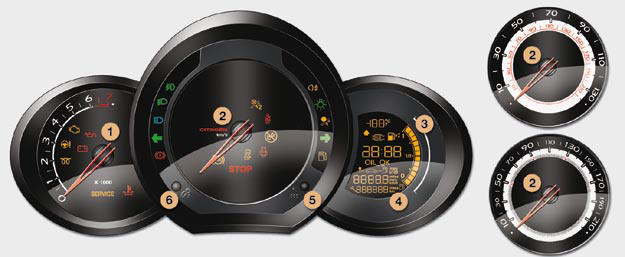
Panel grouping together the vehicle operation indication dials and warning lamps.
Dials
1. Rev counter.
Indicates the speed of rotation of the engine (x 1 000 rpm).
2. Vehicle speed.
Indicates the current speed of the moving vehicle (mph or km/h).
3. Fuel level.
Indicates the quantity of fuel remaining in the tank.
4. Screen.
5. Display management button Servicing information.
Adjust the time and choose units.
Reset the service indicator.
6. Instrument panel lighting button.
Adjusts the brightness of the lighting of the instruments and controls.
For further information, refer to the paragraph relating to the button or function and its associated display.
Screen
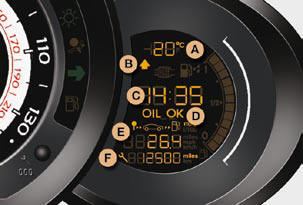
A. Ambient temperature. (°Celsius or °Fahrenheit) B. Gear change indicator.
C. Time.
D. Engine oil level indicator.
Appears a few seconds after switching on the ignition, then disappears.
E. Trip computer.
F. Service indicator
(miles or km) then,
Total mileage.
These two functions are displayed successively when switching on the ignition.


Other info:
Nissan Micra. Trip computer
When the ignition switch is placed in the ON
position, modes of the trip computer can be
selected by pushing the trip computer
change/reset button A on the instrument panel
located near the speedo ...
Chevrolet Sonic. Engine Compartment Overview
1.4L L4 Engine
1. Engine Air Cleaner/Filter.
2. Engine Oil Dipstick. See Engine Oil.
3. Engine Cooling Fan (Out of View). See Cooling System.
4. Engine Oil Fill Cap. See Engine Oil.
5. Engine C ...
Seat Ibiza. Diesel engine 1.9l TDI 74 kW (100 bhp)
General engine data
a) Cetane-Number (cetane index) = Measure of the combustion power of the diesel.
Performance figures
Weights
Trailer weights
Engine oil capacity
...
Manuals For Car Models
-
 Chevrolet Sonic
 -
 Citroen C3
 -
 Fiat Punto
 -
 Honda Fit
 -
 Mazda 2
 -
 Nissan Micra
 -
 Peugeot 208
 -
 Renault Clio
 -
 Seat Ibiza
 -
 Skoda Fabia
 - Honda Pilot
- Volkswagen ID4
- Toyota Prius
