
Honda Fit: Armrest
Honda Fit Owners Manual
■Using the Driver’s Seat Armrest*
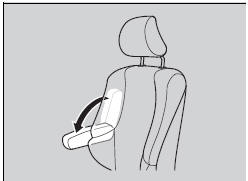
Pull down the armrest.


Other info:
Mazda 2. Audio Set (Type A/Type B)
Power/Volume/Sound Controls
Clock
Operating the Radio (Type A)
Operating the Radio (Type B)
Operating the Compact Disc (CD) Player
How to use Auxiliary jack/USB port
Error Indicatio ...
Chevrolet Sonic. Radio with Touchscreen
The infotainment system can play music or movies connected by the auxiliary device.
Play will begin when the system has finished reading the information on the device.
Playing Music
To play the m ...
Mazda 2. Operational Range
The system operates only when the driver
is in the vehicle or within operational
range while the key is being carried.
NOTE
When the battery power is low, or in
places where there are high-intens ...
Manuals For Car Models
-
 Chevrolet Sonic
-
 Citroen C3
-
 Fiat Punto
-
 Honda Fit
-
 Mazda 2
-
 Nissan Micra
-
 Peugeot 208
-
 Renault Clio
-
 Seat Ibiza
-
 Skoda Fabia
- Honda Pilot
- Volkswagen ID4
- Toyota Prius
