

Mazda 2: Lane Departure Warning System (LDWS)
Mazda2 Owners Manual
The LDWS system notifi es the driver that the vehicle may be deviating from its lane.
The system detects the white or yellow lines on the traffi c lane using the forward sensing camera and if it determines that the vehicle may be deviating from its lane, it notifi es the driver using the active driving display (vehicles with active driving display), and by fl ashing the LDWS warning light and activating the LDWS warning beep.
Use the LDWS when you drive the vehicle on roads with white or yellow lines.
Refer to Forward Sensing Camera on page 4-129 .
Use the LDWS when you drive the vehicle on roads with white or yellow lines.
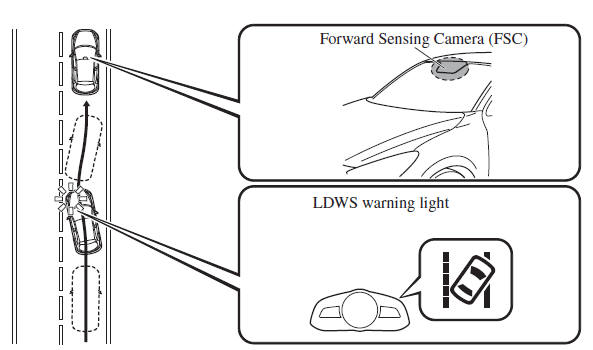
The warning light illuminates when the system has a malfunction.
Refer to Warning Lights on page 4-38 .
WARNING
Do not use the LDWS under the following conditions: The system may not operate adequately according to the actual driving conditions, resulting in an accident.
- Driving on roads with tight curves.
- Driving under bad weather conditions (rain, fog, and snow).
The functions of the LDWS have limitations: Always stay on course using the steering wheel and drive with care. The system is not designed to compensate for a driver’s lack of caution and if you rely too much on the LDWS it could lead to an accident. The driver is responsible for assuring lane changes and other manoeuvres. Always pay attention to the direction in which the vehicle is travelling and the vehicle’s surroundings.
CAUTION
Do not modify the suspension. If the vehicle height or the damping force of the suspensions is changed, the LDWS may not operate correctly
NOTE
- If your vehicle deviates from its traffi c lane, the LDWS operates (warning sound and indicator light). Steer the vehicle adequately to drive the vehicle to the centre of the lane.
- When the direction indicator lever is operated for a lane change, the LDWS warning is automatically cancelled. The LDWS warning becomes operable when the direction indicator lever is returned and the system detects the white or yellow lines.
- If the steering wheel, accelerator pedal, or brake pedal is operated abruptly and the vehicle moves close to a white or yellow line, the system determines that the driver is making a lane change and the LDWS warning is automatically cancelled.
- The LDWS may not operate during the period immediately after the vehicle has deviated from its lane and the LDWS has operated, or the vehicle deviates from its lane repeatedly within a short period of time.
- The LDWS does not operate if it does not detect the white or yellow lines of the traffi c lane.
Under the following conditions, the LDWS may not be able to detect white or yellow lines correctly and the LDWS may not operate correctly.
- If an object placed on the instrument panel is refl ected in the windscreen and picked up by the camera.
- Heavy luggage is loaded in the luggage compartment or on the rear seat and the vehicle is inclined.
- The tyre pressures are not adjusted to the specifi ed pressure.
- When the vehicle is driven on the entry and exit to or from the rest area or tollgate of a highway.
- The white or yellow lines are less visible because of dirt or paint fl aking.
- The vehicle ahead is running near a white or yellow line and the line is less visible.
- A white or yellow line is less visible because of bad weather (rain, fog, or snow).
- The vehicle is driven on a temporary lane or section with a closed lane due to construction.
- A misleading line is picked up on the road such as a temporary line for construction, or because of shade, lingering snow, or grooves fi lled with water.
- The surrounding brightness suddenly changes such as when entering or exiting a tunnel.
- The illumination of the headlights is weakened because of dirt or the optical axis is deviated.
- The windscreen is dirty or foggy.
- Back-light is refl ecting from the road surface.
- The road surface is wet and shiny after rain, or there are puddles on the road.
- The shade of a guardrail parallel to a white or yellow line is on the road.
- The width of a lane is excessively narrow or wide.
- The road is excessively uneven.
- The vehicle is shaken after hitting a road bump.
- There are two or more adjacent white or yellow lines.
- There are various road markings or lane markings of various shapes near an intersection.
When The System Operates
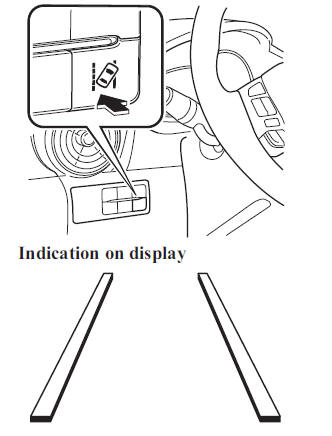
- The system goes on operation standby
when the LDWS switch is pressed
and the LDWS OFF indicator light
in the instrument cluster turns off.
For vehicles equipped with the active driving display, the driving lane (border lines) is indicated in the display.
- Drive the vehicle in the centre of the driving lane while the LDWS OFF indicator light is turned off. The system becomes operational when all of the following conditions are met.
- The vehicle is driven in the centre of the driving lane with the white or yellow lines on the left and right sides, or on either side.
- The vehicle speed is 70 km/h (44 mph) or faster.
- The vehicle is driven on a straight road or road with gentle curves.
For vehicles equipped with the active driving display, the driving lane is indicated in the display.
Indication on display 
The LDWS does not operate in the following cases:
- The system cannot detect white or yellow lines.
- The vehicle speed is less than 65 km/h (40 mph).
- The vehicle is making a sharp curve.
- The vehicle is making a curve at an inadequate speed.
NOTE
- The LDWS does not operate until the system detects a white or yellow line on either the left or right.
- When the system detects a white or yellow line on one side only, the system will activate the warning only when the vehicle deviates on the side where the white or yellow line is being detected.
- The distance and warning sensitivity
(likelihood of a warning) which
the system uses to determine the
possibility of a lane departure can be
changed.
Refer to Personalisation Features on page 9-13 .
Auto cancel
In the following cases, the LDWS cancels automatically and the LDWS warning light in the instrument cluster turns on.
For vehicles equipped with the active driving display, the lane (border lines) is indicated in the display. The LDWS is enabled automatically when the operation conditions are met, and the LDWS warning light turns off.
- The temperature inside the camera is high or low.
- The windscreen around the camera is foggy.
- The windscreen around the camera is blocked by an obstruction, causing poor forward visibility.
Auto cancel warning
When the following operations are performed, the LDWS determines that the driver intends to make a lane change and the LDWS warning is cancelled automatically. The LDWS is enabled automatically after the driver performs the operation.
- The steering wheel is operated abruptly.
- The brake pedal is depressed abruptly.
- The accelerator pedal is depressed abruptly.
- The direction indicator lever is operated (after the direction indicator lever is returned, the LDWS may not operate for about 3 seconds which is the period of time required to make a lane correction).
NOTE
After about 60 seconds have elapsed with the direction indicator lever left operating, the LDWS warning may operate if the vehicle is close to a white or yellow line.
Cancelling The System
Press the LDWS switch to cancel the LDWS. The LDWS OFF indicator light turns on.
For vehicles with the active driving
display, the driving lane indication in the
active driving display is not indicated
when the LDWS is cancelled. 
LDWS Warning
If the system determines that there is the possibility of a lane departure, the LDWS warning beep activates and the LDWS warning light fl ashes. Operate the steering wheel appropriately and steer the vehicle to the centre of the lane.
For vehicles equipped with the active driving display, if there is the possibility of a lane departure, the system indicates the direction it determines that the vehicle is deviating in the active driving display.
Indication on display 
NOTE
- If the LDWS warning sound is set to rumble, the sound will be heard from the vehicle speaker on the side which the system determined the vehicle may be deviating from its lane.
- It may be diffi cult to hear the LDWS warning beep depending on the surrounding conditions such as outside noise.
- The type of warning sound and the
volume can be changed.
Refer to Personalisation Features on page 9-13 .


Other info:
Seat Ibiza. Rearview mirrors
Adjusting the head restraints
Before beginning any journey, adjust the rear-view mirrors for correct visibility.
Interior mirror
It is dangerous to drive if you cannot see clearly through the rear ...
Honda Fit. Audio System Basic Operation
To use the audio system function, the ignition switch must be in ACCESSORY
or
ON .
Use the selector knob to access some audio
functions.
Selector knob: Rotate left or right to scroll
throug ...
Peugeot 208. Fitting a wheel
Fitting the "space-saver" spare wheel
If your vehicle is fitted with alloy wheels, when tightening the bolts on fitting,
it is normal to notice that the washers do not come into contact ...
Manuals For Car Models
-
 Chevrolet Sonic
 -
 Citroen C3
 -
 Fiat Punto
 -
 Honda Fit
 -
 Mazda 2
 -
 Nissan Micra
 -
 Peugeot 208
 -
 Renault Clio
 -
 Seat Ibiza
 -
 Skoda Fabia
 - Honda Pilot
- Volkswagen ID4
- Toyota Prius
