
Nissan Micra: Battery replacement
Nissan Micra Owners Manual
| CAUTION Be careful not to allow children to swallow the battery or removed parts. |
KEY FOB (if so equipped)
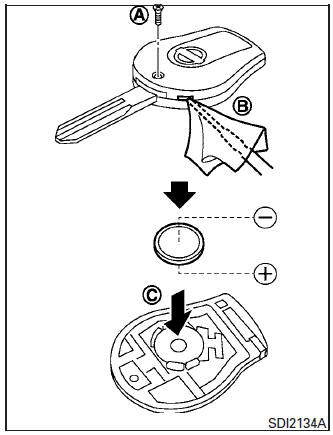
Replace the battery in the key fob as follows:
- Remove the screw A .
- Insert a small screwdriver into the slit of the corner B and twist it to separate the upper part from the lower part. Use a cloth to protect the casing.
- Replace the battery with a new one.
- Do not touch the internal circuit and electric terminals as doing so could cause a malfunction.
- Make sure that the + side faces the bottom of the case C .
- Recommended battery: CR1620 or equivalent.
- Close the lid and install the screw securely.
- Operate the buttons to check its operation.
See a NISSAN dealer if you need assistance for replacement.
If the battery is removed for any reason other than replacement, perform step 5.
- An improperly disposed battery can hurt the environment. Always confirm local regulations for battery disposal.
- The key fob is water-resistant; however, if it does get wet, immediately wipe completely dry.
- The operational range of the key fob extends to approximately 10 m (33 ft) from the vehicle. This range may vary with conditions.
Operation is subject to the following two conditions: (1) This device may not cause harmful interference, and (2) this device must accept any interference received, including interference that may cause undesired operation of the device.
FCC Notice:
For USA:
This device complies with Part 15 of the
FCC Rules. Operation is subject to the following
two conditions: (1) This device may
not cause harmful interference, and (2) this
device must accept any interference received,
including interference that may
cause undesired operation.
Note: Changes or modifications not expressly approved by the party responsible for compliance could void the user’s authority to operate the equipment.
For Canada:
This device complies with Industry Canada
licence-exempt RSS standard(s). Operation
is subject to the following two conditions:
(1) this device may not cause interference,
and (2) this device must accept any
interference, including interference that
may cause undesired operation of the device.


Other info:
Peugeot 208. Selective unlocking
This is set via the
configuration menu.
Complete unlocking is activated by default.
Using the remote control
To unlock the driver's
door only press the open padlock once.
To unlock the ot ...
Mazda 2. Steering Wheel
WARNING
Never adjust the steering wheel while
the vehicle is moving:
Adjusting the steering wheel while the
vehicle is moving is dangerous. Moving
it can very easily cause the driver
to abruptly ...
Chevrolet Sonic. Remote Lock, Unlock, Start
Select Remote Lock, Unlock, Start and the following may display:
Remote Unlock Feedback
Remote Lock Feedback
Remote Door Unlock
Remote Unlock Feedback
When on, the exterior lamps will flas ...
Manuals For Car Models
-
 Chevrolet Sonic
 -
 Citroen C3
 -
 Fiat Punto
 -
 Honda Fit
 -
 Mazda 2
 -
 Nissan Micra
 -
 Peugeot 208
 -
 Renault Clio
 -
 Seat Ibiza
 -
 Skoda Fabia
 - Honda Pilot
- Volkswagen ID4
- Toyota Prius
