

Peugeot 208: Selection
Peugeot 208 Owners Manual
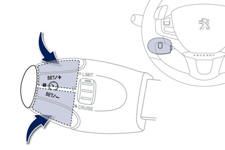
To select a memorised speed:
- press and hold button " + " or "- "; the system stops at the closest memorised speed,
- press and hold button " + " or "- " again to select another memorised speed.
A reminder of the speed and the state of the system (on / off) is displayed in the instrument panel.


Other info:
Renault Clio. Accessories
Electrical and electronic accessoriesBefore installing
this type of accessory (particularly for transmitters/receivers:
frequency bandwidth, power level, position
of the aerial, etc. ...
Skoda Fabia. Tyre pressure monitor
Fig. 135 Button for setting the tyre inflation pressure control value
System settings
A system configuration must be run as follows after adjusting the tyre
pressure,
after changing one or mo ...
Skoda Fabia. Changing a wheel
Remove the full wheel trim » page 155 or caps » page 155.
First of all slacken the anti-theft wheel bolt and then the other wheel
bolts
Jack up the vehicle until the wheel that needs changi ...
Manuals For Car Models
-
 Chevrolet Sonic
 -
 Citroen C3
 -
 Fiat Punto
 -
 Honda Fit
 -
 Mazda 2
 -
 Nissan Micra
 -
 Peugeot 208
 -
 Renault Clio
 -
 Seat Ibiza
 -
 Skoda Fabia
 - Honda Pilot
- Volkswagen ID4
- Toyota Prius
