

Citroen C3: Changing a fuse
Citroen C3 Owners Manual
Procedure for replacing a faulty fuse with a new fuse to rectify a failure of the corresponding function.
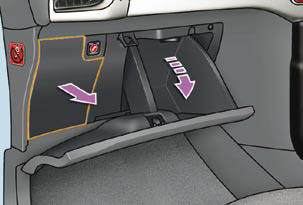
Access to the tools
The extraction pliers and the spare fuse storage locations are fi tted to the back of the dashboard fusebox cover.
For access to them:
- open the glove box lid,
- unclip the fusebox cover by pulling on the side,
- remove the cover completely,
- remove the pliers.
Changing a fuse
Before changing a fuse, the cause of the failure must be identifi ed and rectifi ed.
Identify the faulty fuse by checking the condition of its fi lament.
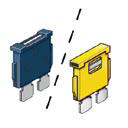
Correct
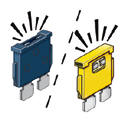
Incorrect
- Use the special pliers to extract the fuse from its housing.
- Always replace the faulty fuse with a fuse of the same rating.
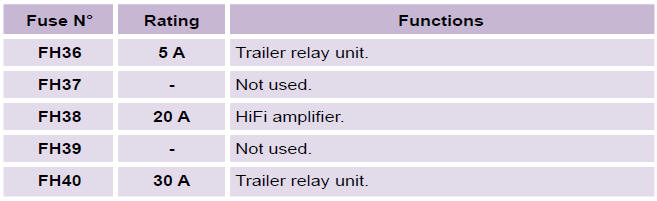
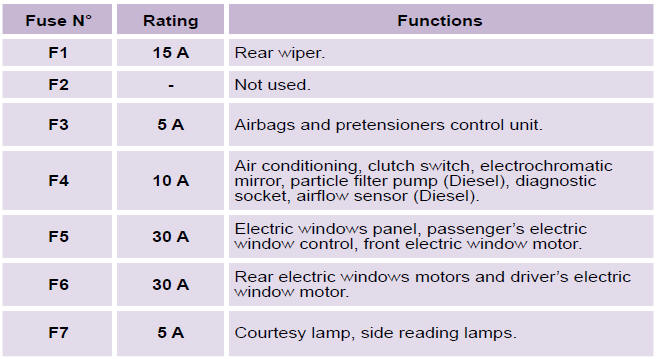
- Check the correspondence between the number etched on the box, the rating etched on the fuse and the tables below.
Installing electrical accessories
Your vehicle’s electrical system is designed to operate with standard or optional equipment. Before installing other electrical equipment or accessories on your vehicle, contact a CITROËN dealer.
CITROËN will not accept responsibility for the cost incurred in repairing your vehicle or for rectifying malfunctions resulting from the installation of accessories not supplied and not recommended by CITROËN and not installed in accordance with its instructions, in particular when the combined consumption of all of the additional equipment connected exceeds 10 milliamperes.
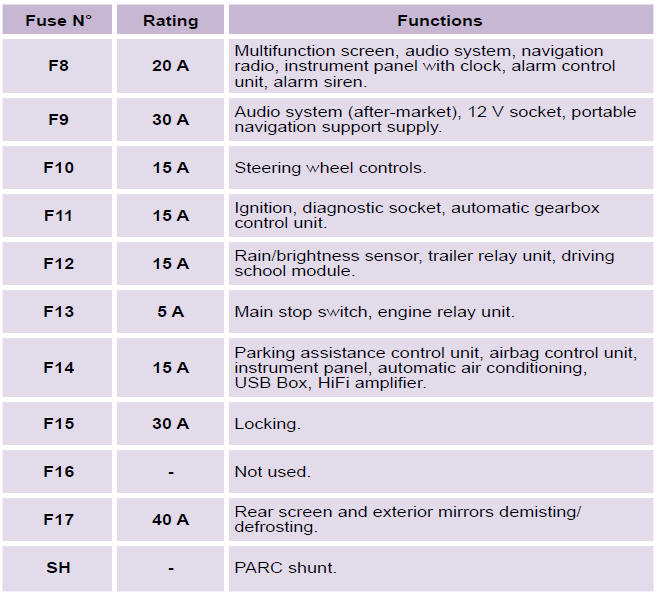
Dashboard fusebox
The fuse box is placed in the lower section of the dashboard (left-hand side).
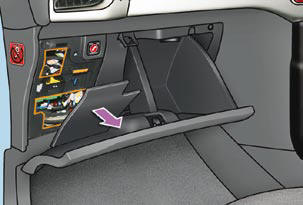
Access to the fuses
Refer to the paragraph "Access to the tools".
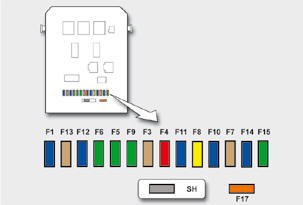
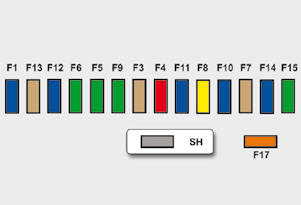
Fuse tables
Engine compartment fusebox
The fusebox is placed in the engine compartment near the battery (left-hand side).
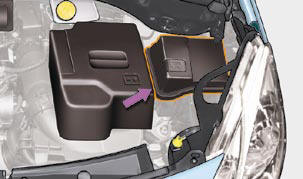
Access to the fuses
- Unclip the cover.
- Change the fuse (see corresponding paragraph).
- When you have fi nished, close the cover carefully to ensure the sealing of the fuse box.
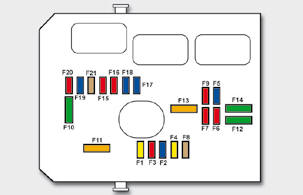
Fuse table
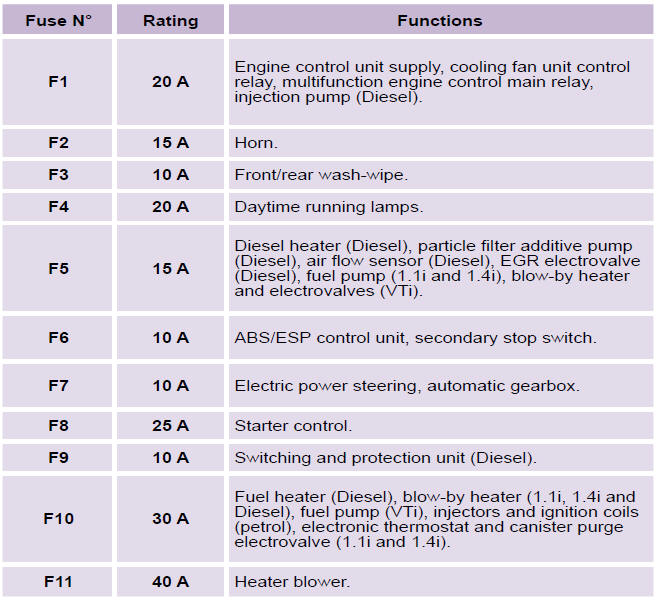
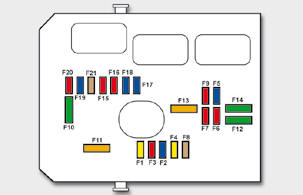
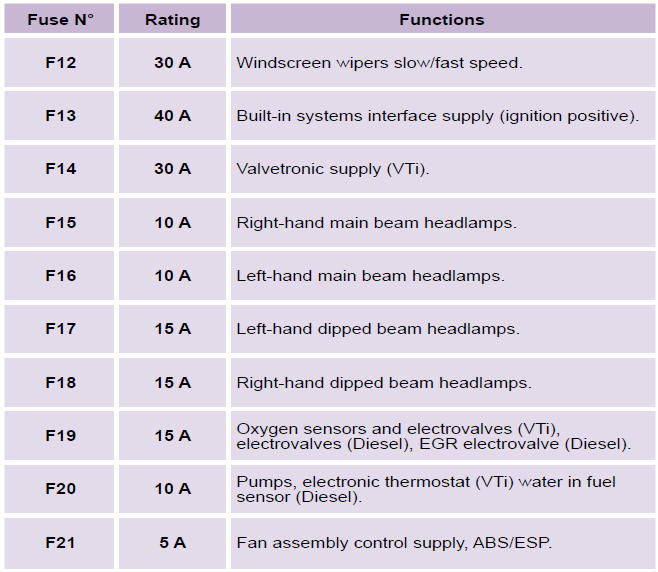
Table of maxi-fuses
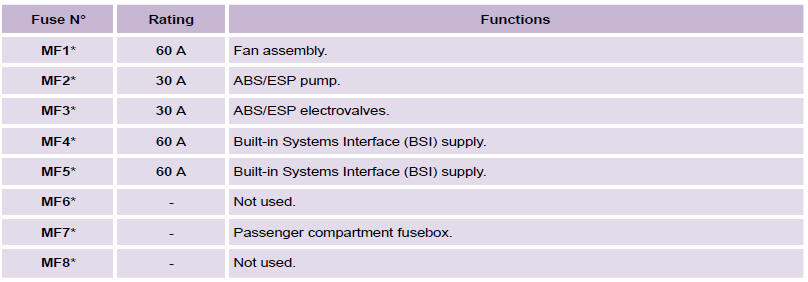
* The maxi-fuses provide additional protection for the electrical systems. All work on the maxi-fuses must be carried out by a CITROËN dealer.


Other info:
Nissan Micra. Outside mirrors
WARNING
Objects viewed in the outside mirror on
the passenger side are closer than they
appear. Be careful when moving to the
right. Using only this mirror could cause
an ac ...
Chevrolet Sonic. Connection Settings
Select and the following may display:
Bluetooth Settings
Change Ringtone
Ringtone Volume
Bluetooth Settings
Select this feature to:
Connect, disconnect, or delete a device
Change or ...
Nissan Micra. Windshield-washer fluid
Add a washer solvent to the windshield-washer
fluid reservoir for better cleaning. In the winter
season, add a windshield-washer antifreeze. Follow
the manufacturer’s instructions for the mix ...
Manuals For Car Models
-
 Chevrolet Sonic
 -
 Citroen C3
 -
 Fiat Punto
 -
 Honda Fit
 -
 Mazda 2
 -
 Nissan Micra
 -
 Peugeot 208
 -
 Renault Clio
 -
 Seat Ibiza
 -
 Skoda Fabia
 - Honda Pilot
- Volkswagen ID4
- Toyota Prius
