
Citroen C3: Instruments and controls
Citroen C3 Owners Manual
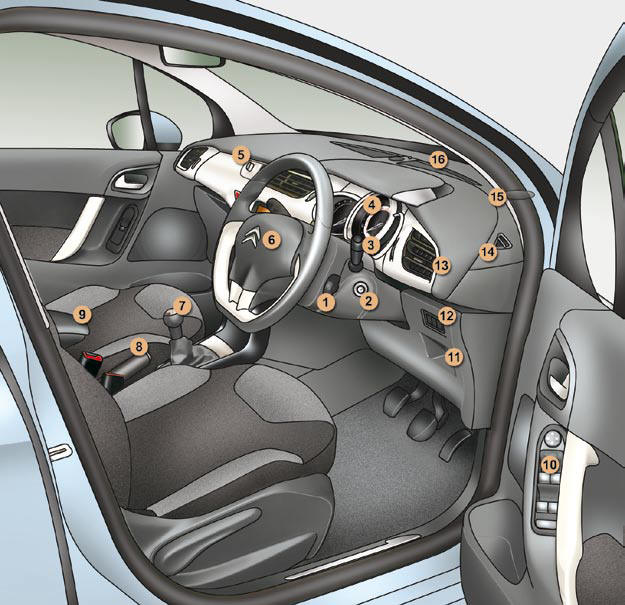
1. Audio equipment steering wheel controls.
2. Steering lock and ignition.
3. Wipers/wash-wipe/trip computer controls.
4. Instrument panel.
5. Scented air freshener.
6. Driver’s airbag. Horn.
7. Gear lever.
8. Parking brake.
9. Central armrest with storage.
10. Exterior mirror controls.
Electric window controls. Rear doors and electric windows deactivation control.
11. Storage compartment.
12. Electric child lock button or Alarm button. Electronic stability programme button (ESP/ASR).
13. Side adjustable air vent.
14. Front door window demisting/ defrosting vent.
15. Speaker (tweeter).
16. Windscreen demisting/defrosting vent.
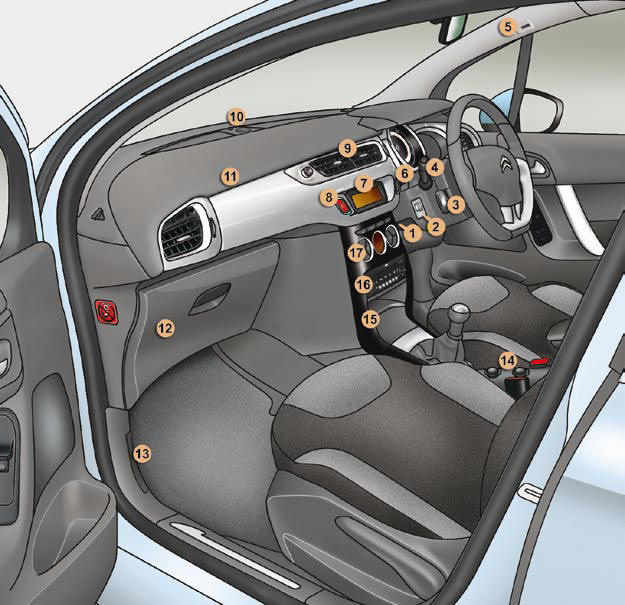
1. Steering wheel adjustment control.
2. Headlamp height adjustment.
3. Cruise control/speed limiter switch.
4. Lighting and direction indicators control.
5. Microphone.
6. Central locking button.
7. Multifunction screen.
8. Hazard warning lamps switch.
9. Central adjustable air vents.
10. Sunshine sensor HiFi audio system central speaker.
11. Passenger airbag.
12. Glove box/Passenger airbag deactivation/Fusebox.
13. Bonnet release control.
14. 12 V accessory socket USB port/Jack socket.
15. Upper and lower storage.
16. MyWay or Audio system.
17. Heating/air conditioning controls.


Other info:
Chevrolet Sonic. Where to Put the Restraint
According to accident statistics, children and infants are safer when properly
restrained in a child restraint system or infant restraint system secured in a rear
seating position.
Whenever possi ...
Renault Clio. Rear bench seat: functions
Position for use
Raise the headrest as far as possible to
use it in the high position. Check that it
is correctly locked.
Storage position
Press button A and lower the headrest
completely.
...
Citroen C3. Identification markings
Various visible markings for the identifi -
cation of your vehicle.
A. Vehicle identifi cation number (VIN)
under the bonnet.
This number is engraved on the bodywork
near the damper mounting.
...
Manuals For Car Models
-
 Chevrolet Sonic
 -
 Citroen C3
 -
 Fiat Punto
 -
 Honda Fit
 -
 Mazda 2
 -
 Nissan Micra
 -
 Peugeot 208
 -
 Renault Clio
 -
 Seat Ibiza
 -
 Skoda Fabia
 - Honda Pilot
- Volkswagen ID4
- Toyota Prius
