
Fiat Punto: Headlights
Fiat Punto Owners Manual
ADJUSTING THE HEADLIGHT BEAM
Proper adjustment of the headlight beams is of vital importance for your safety and comfort and also for the other road users. It is also a specific regulation of the road traffic code. To ensure you and other drivers have the best visibility conditions when travelling with the headlights on, the headlights must be set properly.
Contact Fiat Dealership to have the headlights properly adjusted.
Check beam aiming every time the load carried changes.
HEADLIGHT SLANT ADJUSTING DEVICE
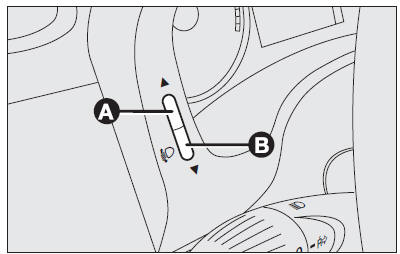
The car is fitted with electric headlight slant adjusting device working with ignition key to MAR and dipped beams on.
When the car is loaded, it slopes backwards. This means that the headlight beam rises. In this case, it is necessary to return it to the correct position.
To adjust the headlight slant, proceed as follows:
- hold button (B) pressed to increase by one position (e.g.: 0 → 1,1 → 2,2 → 3);
- hold button (A) pressed to decrease by one position (e.g.: 3 → 2,2 → 1,1 → 0).
Each position increase corresponds to a beam slant lowering (laden car).
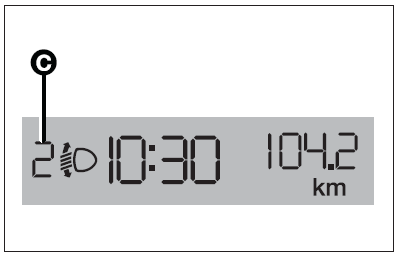
Digital display
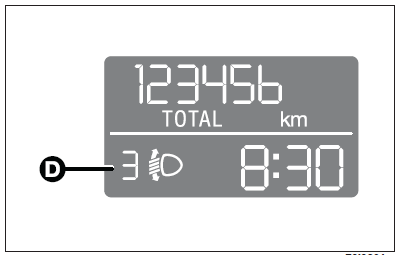
Multifunction display
Correct positions as a function of the load
Position 0 - one or two people occupying the front seats.
Position 1 - five people.
Position 2 - five people + load in the boot.
Position 3 - driver + maximum permissible load stowed in the boot.
IMPORTANT Check beam aiming every time the load carried changes.
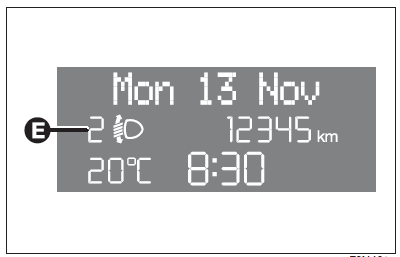
Reconfigurable multifunction display
HEADLIGHT ADJUSTMENT ABROAD
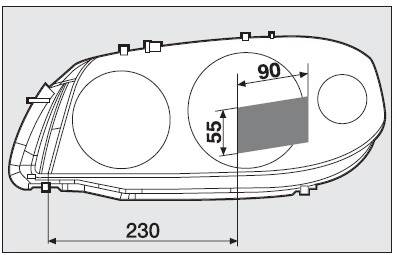
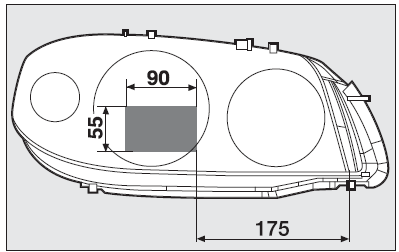
The dipped beam headlights are adjusted for circulation in the country in which the vehicle is marketed. In countries with opposite circulation, to avoid glaring oncoming vehicles it is necessary to cover the areas of the headlight as shown below; this is done using non-transparent sticker tape.
Figures refer to passing from right-hand drive to left-hand drive.


Other info:
Peugeot 208. Daytime running lamps
Daytime lighting, compulsory in certain countries, which comes on automatically
when the engine is started making the vehicle more visible to other users.
This function is assured:
- in countries ...
Honda Fit. Customizing the Auto Door Locking/Unlocking Setting
You can customize the auto door locking/unlocking setting to your liking
using the master door lock switch.
List of the Auto Door Locking/Unlocking Customizable Options
■ Auto door locking
...
Nissan Micra. Air flow charts
The following charts show the button and dial
positions for MAXIMUM AND QUICK heating,
cooling or defrosting. The air intake lever
should always be in the position for
heating and defrosting.
...
Manuals For Car Models
-
 Chevrolet Sonic
 -
 Citroen C3
 -
 Fiat Punto
 -
 Honda Fit
 -
 Mazda 2
 -
 Nissan Micra
 -
 Peugeot 208
 -
 Renault Clio
 -
 Seat Ibiza
 -
 Skoda Fabia
 - Honda Pilot
- Volkswagen ID4
- Toyota Prius
